- llm-applications
- agentic-ai
Moving Beyond Basic Validation in the LLM Era


What is Pydantic?
Pydantic is very useful and go to data validation library for python for type hints and validation during runtime. LLM structured output validation and guardrailing is very convinent using PyDantic.
Why we need the other Advanced Features?
| The Problem (LLM Pain Point) | Pydantic’s Solution |
|---|---|
| Hallucinated References: LLMs often output values that don’t exist in your DB or current session context. | Context-Aware Validation: Pass external data (like a DB session) directly into your validator. |
| Output Extraction: Users want the final answer, but LLMs perform better when they show their reasoning (CoT). | Computed Fields: Keep the reasoning in the background but expose the final result as a clean property. |
| Post-Processing: Raw LLM outputs often need cleanup (removing markdown, extra spaces) before validation. | After-Validators: Clean or transform the data immediately after the initial type check. |
| Agentic Tool Use: Different tasks require different tool schemas, making hardcoded models impossible. | Dynamic Model Creation: Generate Pydantic models on-the-fly based on the tool’s requirements. |
| Ambiguous Routing: An agent might return a “Search” object or a “Final Answer” object in the same response. | Discriminated Unions: Automatically route the data to the correct model based on a specific “type” field. |
Section 1: Context Aware Validation
The core Concept: Standard Pydantic works well for checking is given “product_id” parameter is an integer or not. But while parsing LLM’s output syntatic correctness is also very important to verify. LLM’s may give perfectly formatted JSON output with “table_name” that doesn’t exist in your database.
Context-aware validation allows us to validate LLM output against the current state of our system (like live DB scheama or list of active ID’s) at runtime.
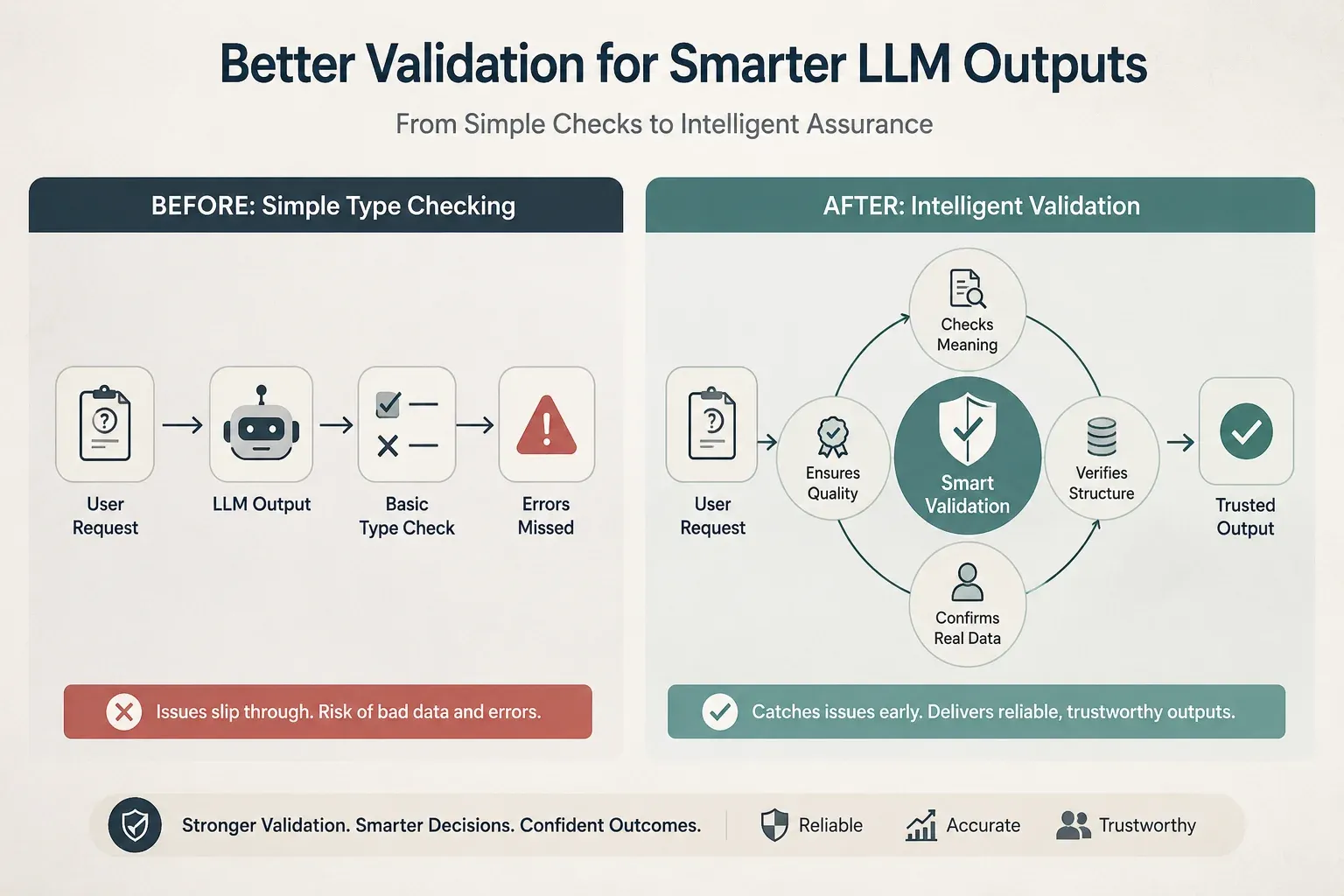 Figure 1: Moving from rigid type-checking to context-aware validation: ensuring LLM outputs aren’t just formatted correctly, but are actually accurate, meaningful, and production-ready.
The Problem: Hallucinated Entities
Imagine an agent designed to query “SQL”. The LLM returns {“table_name”: “user_profiles”}.
- Standard Pydantic : Validate it as string and passes it.
- The reality : Your DB only has a “users” table. So your next query code will crash.
So instead of if/else blog, we should shift this check into validation layer itslef.
The Pydantic Solution: Using ValidationInfo
Pydantic’s “ValidationInfo” object allows us to use this external context directly into the validation task.
Following is the example of how we can use the validationInfo to use the database and prepare a correction prompt accordingly.
import json
from pydantic import BaseModel, field_validator, ValidationError
from pydantic_core.core_schema import ValidationInfo

# 1. Function which defines validation info parameter.
class SQLQueryExtraction(BaseModel):
    table_name: str
    columns: list[str]

    @field_validator("table_name")
    @classmethod
    def validate_table_against_db(cls, value: str, info: ValidationInfo) -> str:
        # Extract the dynamic context passed at runtime
        # If no context is provided, default to an empty list
        valid_tables = info.context.get("db_tables", [])

        if value not in valid_tables:
            # This error message is designed to be fed back to the LLM!
            raise ValueError(
                f"Table '{value}' not found. Available tables: {valid_tables}"
            )
        return value

# 2. Dummy example to set up runtime environment
# In production or real time application, we would run `SELECT table_name FROM information_schema.tables`
current_db_schema = {"db_tables": ["users", "orders", "products"]}

# 3. Dummy LLM response hallucinating a table name
llm_response_json = {"table_name": "user_profiles", "columns": ["id", "email"]}

# 4. Execute the Context-Aware Validation
try:
    # We pass the external data using the `context` keyword argument
    validated_output = SQLQueryExtraction.model_validate(parsed_json, context=current_db_schema)
    print("Success:", validated_output.model_dump())

except ValidationError as e:
    # 5. Catch the error to construct a retry prompt for the LLM
    error_msg = e.errors()[0]['msg']
    print(f"VALIDATION FAILED: {error_msg}")
    print(f"Error caught: {error_msg}")
    # Logic: Send error_msg back to LLM to regenerate.
Why this is helpful for LLM Engineers
- Cleaner Pipeline: If data is actually actionable not just correctly formatted then only model instantiates
- Encapsulation: All if_else business logic inside Pydantic model. No need of scattered if else conditions throughtout application.
- Self-Correction: Error message can be great as feed back into LLM as “retry” prompt.
Section 2: compute_field (Chain of Thought Hider)
The Core Concept: We know that LLM’s performance improves significantly when we ask them to “think step-by-step”. This “Chain-of-Thought (CoT) reasoning improves accuracy of complex logic. But in real world front-end developer or API consumer are interested in Result rather than its Reasoning.
@compute_field helps to capture that reasoning to improve LLM performance, but keep the final businees logic strictly in Python code.
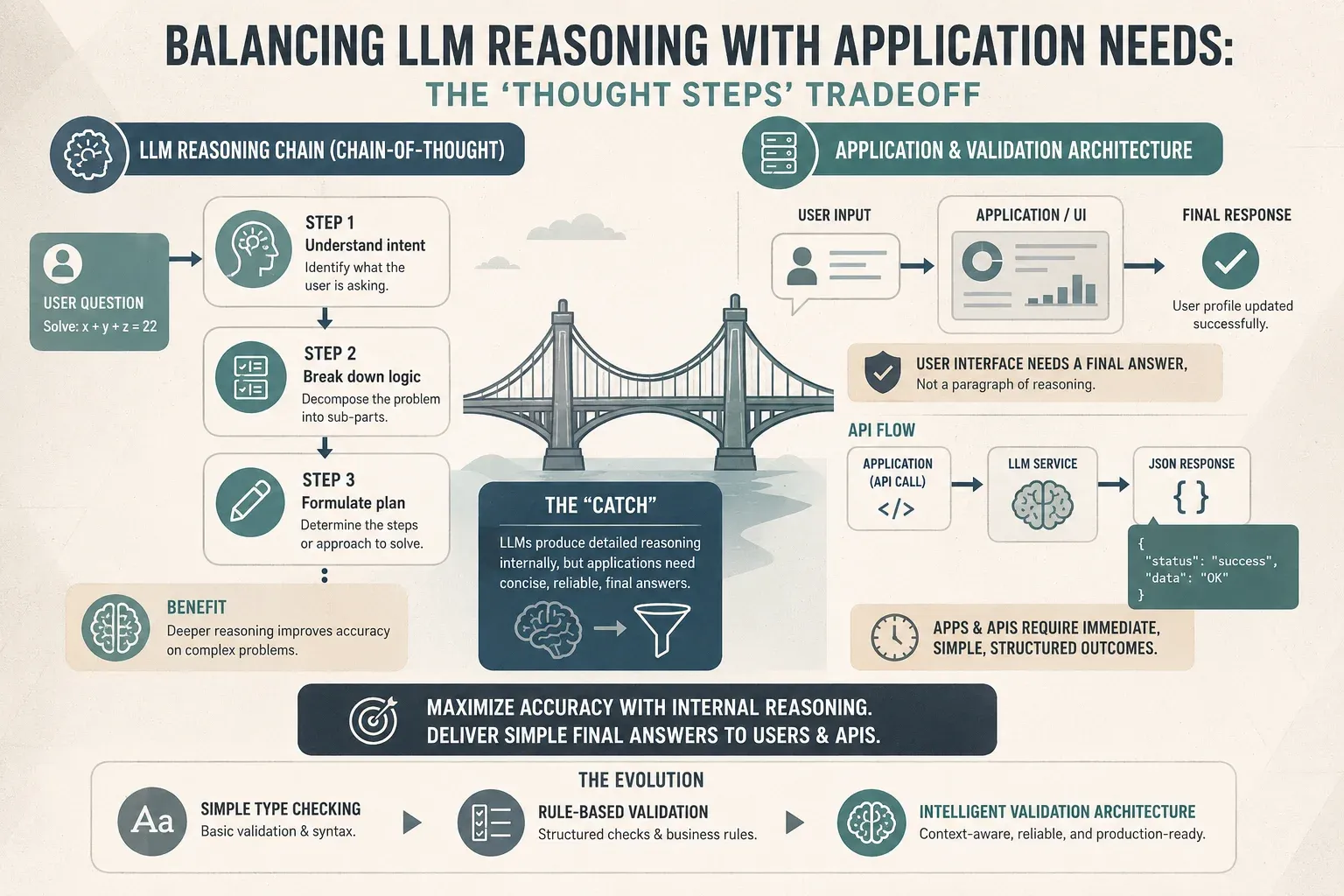 Figure 2: The “Catch” of LLM Reasoning: Balancing deep Chain-of-Thought accuracy with the clean, structured JSON outputs that modern APIs and UIs demand.
The Problem: The “Raw Output” Mess
When you need an LLM to do categorization or some math, you usually face two issues:
- LLM’s are shaky at logic/math: If you ask an LLM to assign category based score, it might get confused or inconsistent (e.g., call 7/10 “High” one time and “Medium” next time).
- Fragmented Code: You end up writinh “cleanup” helper code outside model to process LLM’s raw response.
The Pydantic Solution: @computed_field
Pydantic allows you to define fields that the LLM does not populate. Instead, these fields are calculated dynamically the moment the data is loaded into the model.
from pydantic import BaseModel, Field, computed_field

class SupportTicket(BaseModel):
    # We ask the LLM to "think step by step" here to improve accuracy
    chain_of_thought: str = Field(
        description="Analyze the customer's tone and the urgency of their problem."
    )
    urgency_score: int = Field(
        description="A rating from 1 (low) to 10 (emergency)."
    )

    # --- PYTHON COMPUTED FIELDS ---
    # The LLM doesn't decide the 'status',  our business logic does that
    @computed_field
    def status(self) -> str:
        if self.urgency_score >= 8:
            return "Emergency"
        elif self.urgency_score >= 5:
            return "Priority"
        return "Standard"

    @computed_field
    def requires_manager(self) -> bool:
        # We can look inside the CoT for specific high-risk keywords
        red_flags = ["lawyer", "sue", "legal", "cancel"]
        has_red_flag = any(word in self.chain_of_thought.lower() for word in red_flags)

        return self.urgency_score > 9 or has_red_flag

# --- Example in Action ---
raw_ai_output = {
    "chain_of_thought": "The customer mentioned they are talking to a lawyer because of a billing error",
    "urgency_score": 7
}

ticket = SupportTicket(**raw_ai_output)

print(f"Priority: {ticket.status}")            # Output: Priority
print(f"Alert Manager: {ticket.requires_manager}") # Output: True
Why this is a Game Changer
- Logic Decoupling: You let the LLM handle the reasoning and subjective scoring and let Python handle the math and category labeling.
- Single Source of Truth: Your SupportTicket model is now a self-contained unit. Anyone looking at the code knows exactly how an urgency score and status is calculated
- API Ready: When you call model_dump() or model_dump_json(), the computed fields are included by default. Your frontend gets clean priority and requirement of manager alert as result.
Section 3: model_validator(mode = “after”)
The Core Concept: Sometimes individual fields are technically correct, but the combination of those fields is semantically invalid.\For example, if your LLM generate summary about “Budget Cuts” but lists “Hiring 10 Engineers” as action items, standard validation won’t catch it.
@model_validator(mode=‘after’) allows you to inspect entire object after it has been populated.
The Problem: The Disconnected Response
- Summary: “Short sync about office Infrastructure”
- Action Items: [“Migrate production DB to AWS”, “Implement OAuth2”, “Setup Kubernetes”]
Technically, these are strings. Pydantic would pass it as it followed the schema. But semantically , it is a failure, summary doesnt follow the list of action items.
The Pydantic Solution: @model_validator(mode=‘after’)
The mode=‘after’ is the key. Pydantic: “Let the LLM fill in data first. Once an object is built, then run custom script o ensure the parts actully fits together”
from pydantic import BaseModel, model_validator

class MeetingSummary(BaseModel):
   summary: str
   action_items: list[str]

   @model_validator(mode="after")
   def check_semantic_validity(self):
       # 1. Check for vagueness
       for item in self.action_items:
           if len(item.split()) < 3:
               raise ValueError(f"Action item '{item}' is too vague. Must be descriptive.")
       # 2. Check for internal consistency
       # A summary should logically be substantial if there are many tasks
       if len(self.summary) < 20 and len(self.action_items) >= 3:
           raise ValueError("The summary is too short for the number of action items provided.")
       return self

# Example of a failure
try:
   data = {
       "summary": "Short sync about infrastructure.",
       "action_items": ["Migrate production DB to AWS", "Email server not working", "Implement OAuth2","Setup Kubernetes"]
   }
   result = MeetingSummary(**data)
except ValueError as e:
   print(f"Validation Error: {e}")
   # Output: The summary is too short for the number of action items provided.
In production, you can even use this to run an embedding-based similarity check to ensure the LLM hasn’t drifted from the source transcript:
@model_validator(mode="after")
def verify_against_source(self):
    # This isn't a simple string length check.
    # We call a 'Similarity' tool to see if the LLM made things up.
    is_accurate = some_embedding_tool.compare(self.summary, original_transcript)

    if not is_accurate:
        raise ValueError("The summary contains information not found in the transcript.")
    return self
Why this is helpful for LLMs
- The self-correction loop: When Pydantic raises the ValueError, you can catch it in your python code and send that error message directly back to the LLM.
- It turns Pydantic from a simple type-checker into a Quality Assurance tool.
Section 4: Dynamic Model Creation : create_model
The Core Concept: Static code vs Dynamic Realities Pydantic is widely famous for its elegant, statically defined classes. You write class User(BaseModel), define your fields and so on. But what if you don’t know about the data schema till your code is running?
If you are bulding tool that connects to an ad-hoc database or third-party API, you can’t use predefined classes.
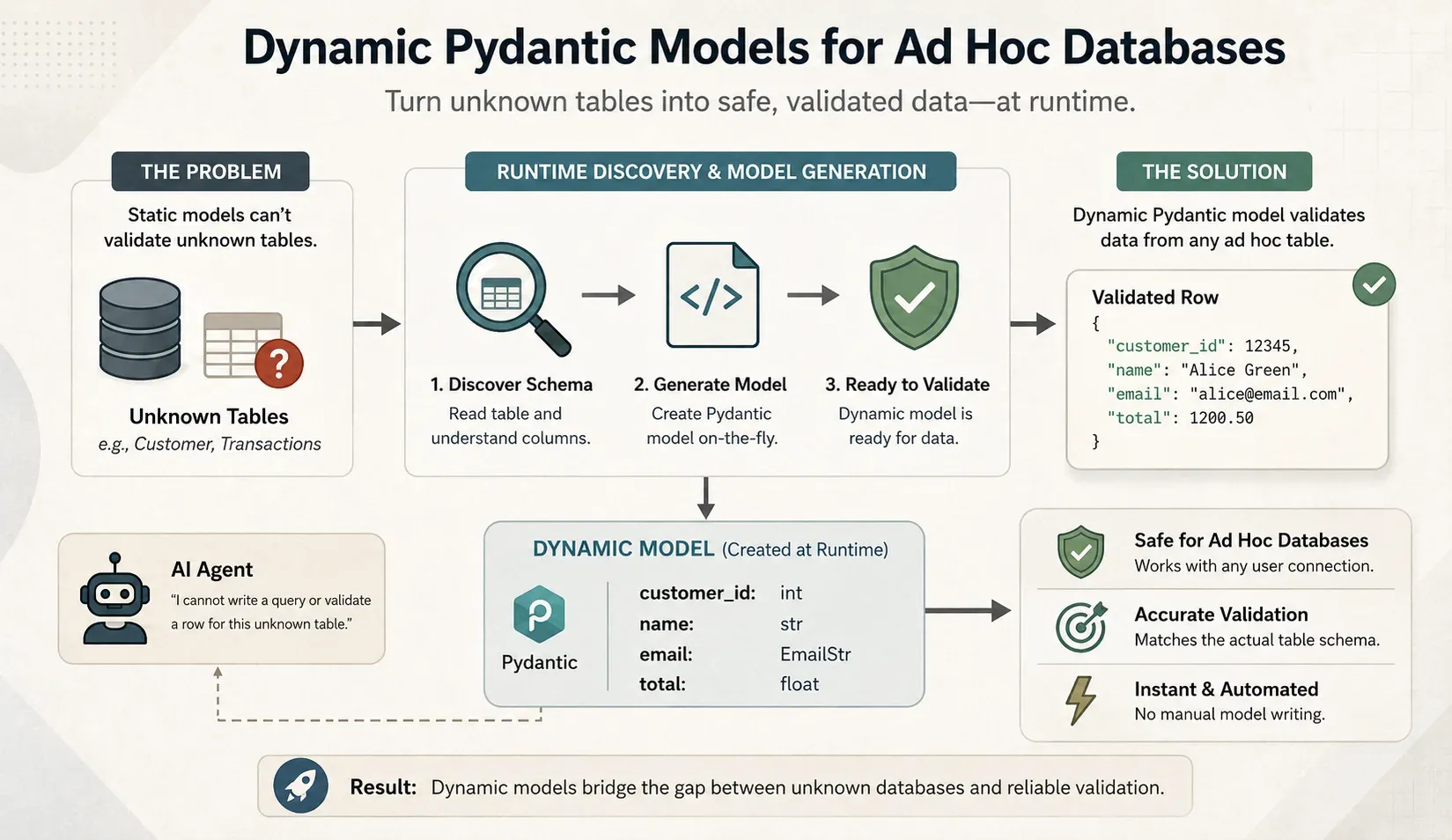 Figure 3: Beyond static schemas: leveraging dynamic Pydantic models to discover and validate unknown database tables at runtime for flexible, type-safe AI agents.
The Problem: Schema Explosion
- If the user connects “customers” table, your LLM needs to output “customers” object.
- If they switch to a “transactions” table, you need “transaction” object.
The Pydantic Solution: create_model
This is a hidden gem of the Pydantic library. It allows you to generate fully functional Pydantic models at runtime using simple python dictionary.
from pydantic import create_model, BaseModel, Field

# 1. Lets assume we have dynamically fetched this schema from a SQL DB at runtime
runtime_db_columns = {
"user_id": (int, ...), # Required integer
"email": (str, ...), # Required string
"is_active": (bool, False) # Optional boolean, defaults to False
}

# 2. Dynamically generate the Pydantic class
DynamicSQLRow = create_model("DynamicSQLRow",**runtime_db_columns)

# 3. Enforce this dynamic schema on the LLM's raw JSON output
llm_json = {"user_id": 101, "email": "alice@example.com"}
row = DynamicSQLRow(**llm_json)

print(row)
# Output: DynamicSQLRow(user_id=101, email='alice@example.com', is_active=False)
Where this will helps in LLM engineering
When you use “Structured Outputs” or “Tool Calling” the LLM relies heavily on Field Descritions to understand what it needs to generate.
You aren’t limited to just types; you can dynamically inject Field objects to give the LLM context!
- Database Metadata: Featching “comments” from PostegreSQL or Snowflake tables.
- Config Mappings: A central JSON file mapping column names to business meanings.
- LLM Pre-processing: Use of fast and cheap LLM models to guess descriptions for blind scheama before the main model generates data.
from pydantic import create_model, Field

# 1. The raw schema fetched from your database at runtime
raw_db_schema = {"user_id": int, "email": str, "transaction_total": float}

# 2. Your descriptions (fetched from DB comments, or a config file)
column_metadata = {
    "user_id": "The unique primary key for the user.",
    "email": "The user's corporate email address. Must contain an @ symbol.",
    "transaction_total": "The total value of the cart in USD."
}

# 3. Programmatically build the Pydantic fields dictionary
dynamic_fields = {}

for col_name, col_type in raw_db_schema.items():
    # Grab the description if we have one, otherwise fall back to a generic one
    desc = column_metadata.get(col_name, f"The {col_name} field.")
    # Construct the tuple: (Type, Field(..., description="..."))
    # The '...' means it is required.
    dynamic_fields[col_name] = (col_type, Field(..., description=desc))

# 4. Generate the model!
DynamicQueryModel = create_model("DynamicQueryModel", **dynamic_fields)

# When we dump the JSON schema, we can see LLM gets the description.
import json
print(json.dumps(DynamicQueryModel.model_json_schema(), indent=2))
Section 5: Routing with Discriminated Unions
The core Concept: If you’ve ever built an AI Agent, you know the “Giant Schema” headache. You want your agent to use tools, but as you add more capabilities - Web Search, Database Access, Python Execution - the input schema becomes a huge mess. This causes LLM to get confused and start mixing up arguments
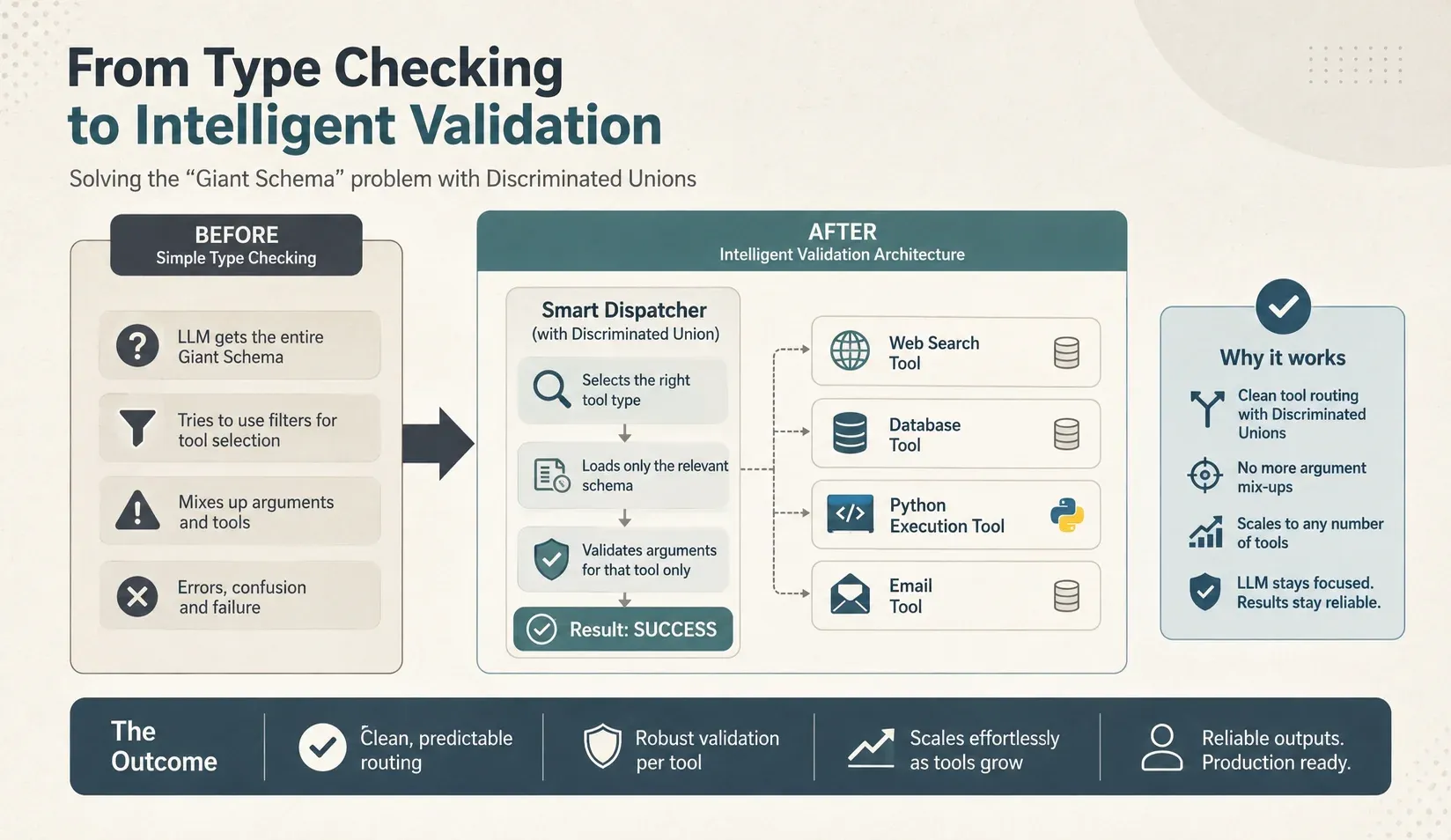 Figure 4: Solving the “Giant Schema” problem: Using Discriminated Unions to create smart dispatchers that route LLM requests to the right tool with pinpoint accuracy and zero argument mix-ups.
The Problem: The messy model
Without strict and proper routing, in most of the cases LLM gets forced to look at a single massive model containing every possible argument for available tools. This is very cumbersome to manage and validate.
The Pydantic Solution: Discriminated Union
Pyndantic uses specific field (like tool_type or action) to instantly route the incoming JSON to the correct python class.
from typing import Union, Literal, Annotated
from pydantic import BaseModel, Field

# Define different actions
class SearchAction(BaseModel):
    tool_type: Literal["search"]
    query: str

class CalculatorAction(BaseModel):
    tool_type: Literal["calculator"]
    expression: str

# Use Discriminated Union for routing
class AgentAction(BaseModel):
    action: Annotated[
        Union[SearchAction, CalculatorAction],
        Field(discriminator='tool_type')
    ]

# Usage
data = {"action": {"tool_type": "search", "query": "latest news"}}
route = AgentAction.model_validate(data)
print(type(route.action))  # <class '__main__.SearchAction'>
Why this is a game changer for LLM apps
- Zero-Ambiguity Validation: If the LLM outputs
"tool_name": "search", Pydantic only cares about the fields insearch tool. It will throw an immediate, clear error if the LLM forgets thequeryfield or tries to hallucinate aqueryfield. - Cleaner Prompting: You can pass these individual schemas to your LLM (via Tool Calling APIs), ensuring the model knows exactly what “shape” each tool requires.
Conclusion
By moving beyond basic type checking feature of Pydantic library, we can use these advanced features - Context-Awareness, Computed Fields, After-Validators, Dynamic Models, and Discriminated Unions to bridge gap AI product Script to Production level ready system. Stop using Pydantic as just validator. Start using it as Quality Assurance layer of your LLM backend.