The Last Mile of Healthcare: Building an AI Diagnostic Tool for Rural Communities
Introduction
Let’s face it. It’s 2026, India as a country is growing. The population is at its all time-high. Indian urban health-care facilities are amongst the best in the world. Despite all of this, India as a country is facing a stark reality with a doctor-to-patient ratio far below the WHO recommended standard. As a result, millions of people in rural areas go without timely medical attention. A visit to the nearest clinic can result in hours of travel, long queues, and sometimes, no doctor at all.
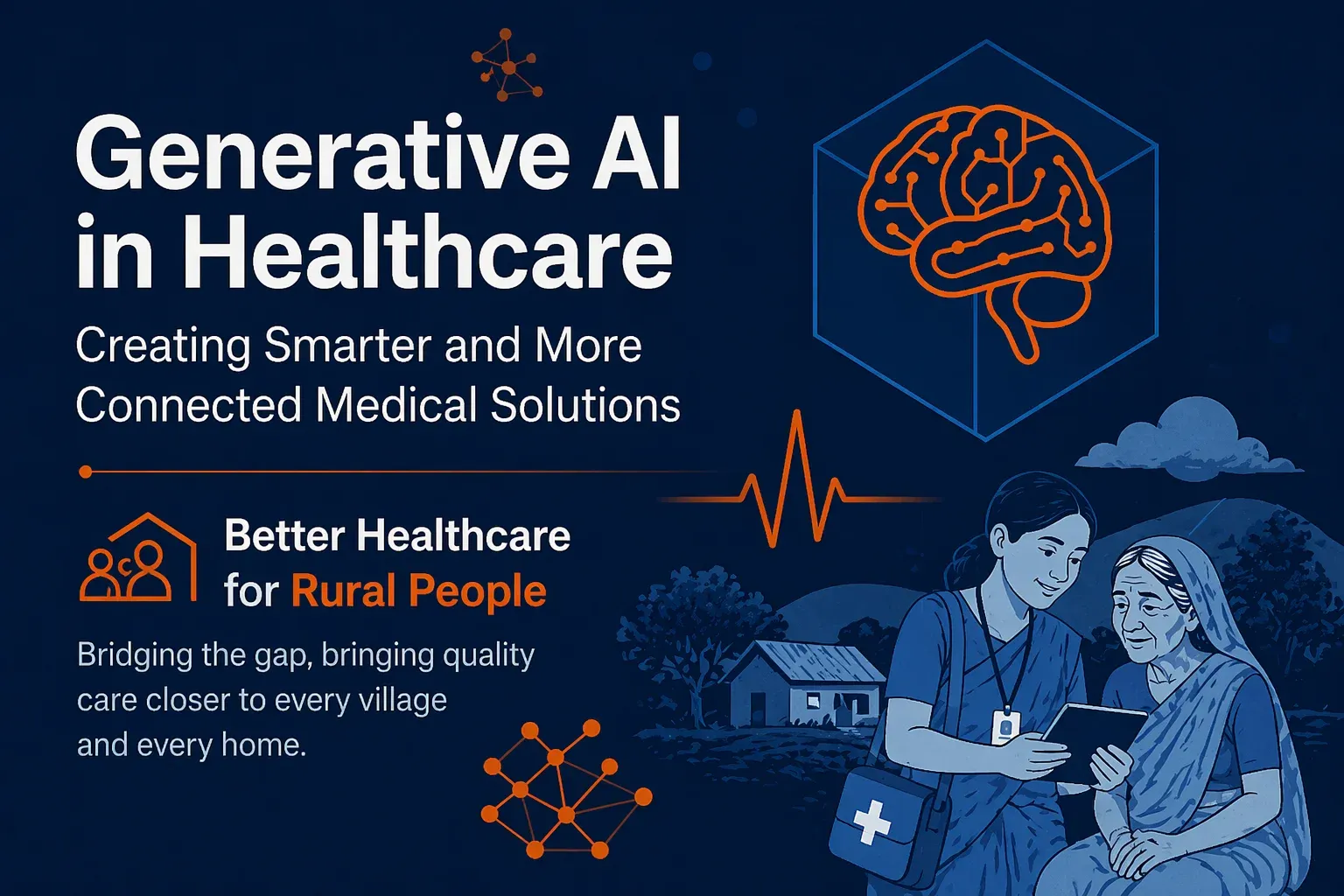
In this work, we present our solution to the challenge “AI for Bharat”, where we make an attempt to address this gap. We built an AI-assisted healthcare diagnostic platform designed specifically for rural India. The system allows patients or ASHA workers acting on their behalf to describe their symptoms in a conversational chat interface, in their preferred language (Hindi, English, or regional languages). An AI powered system then asks intelligent follow-up questions, gathers symptoms and generates a structured preliminary diagnosis with confidence scores, urgency levels, differential diagnoses, and recommended actions.
We all know that trust is the biggest concern when it comes to human health, hence AI alone can never be the final word. Every diagnosis is queued for review by a qualified doctor, who can approve it, request additional information from the patient, and write a complete prescription. Once finalized, patients can even ask the AI to explain the doctor’s report back to them in simple, plain language — in their own language.
The system is built with three roles in mind: A patient who needs care, a doctor who provides validation and oversight, and an ASHA worker — India’s frontline community health workers — who serve as a bridge for patients without smartphone access. At its core, the solution proposed in AI for Bharat is not about replacing doctors. It’s about making sure that when a doctor isn’t immediately available, patients don’t have to wait in the dark.
The Problem: Healthcare in Rural India
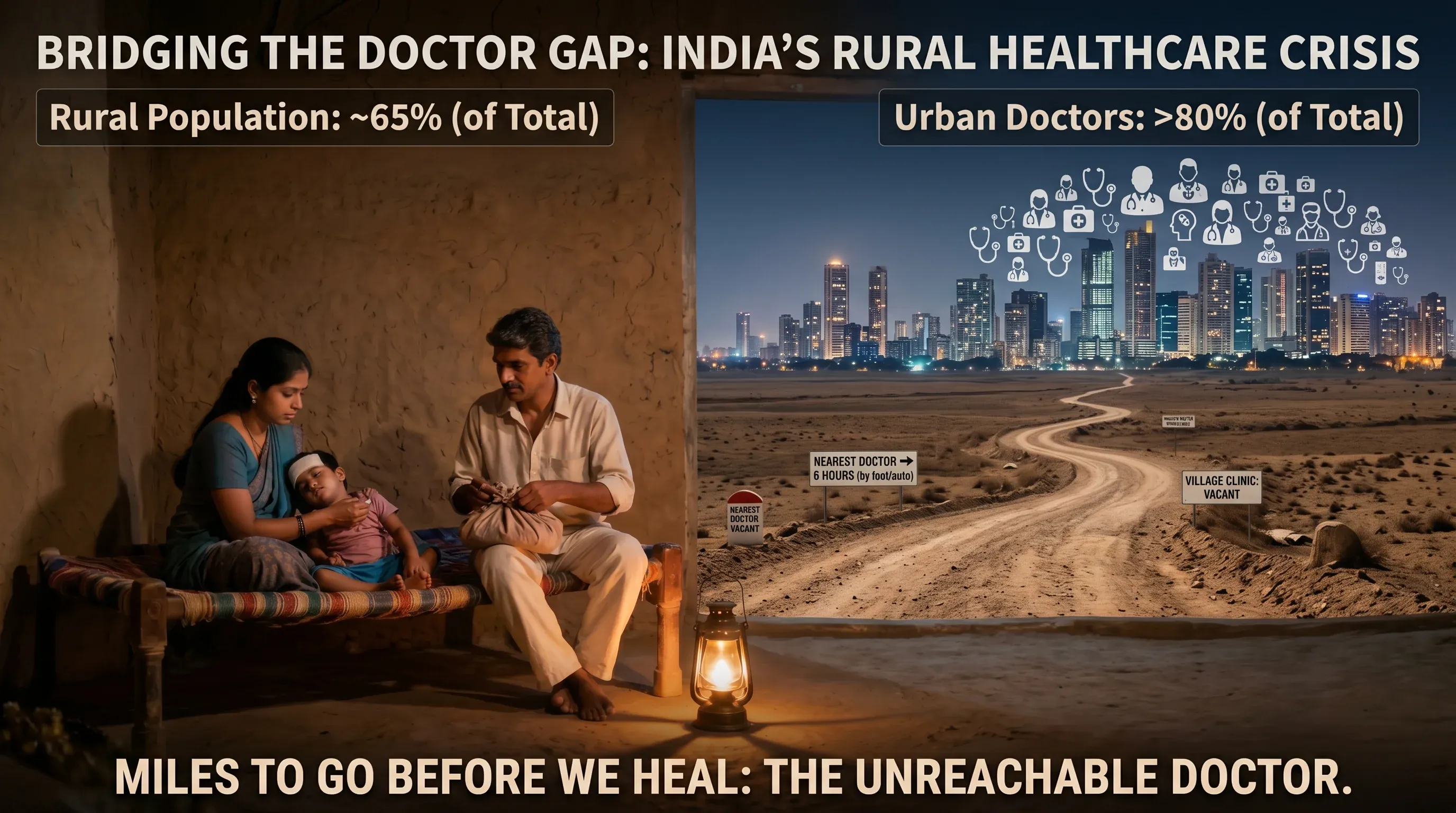
Figure 1: Statistics highlighting the doctor-patient ratio disparity and the scale of rural healthcare access crisis in India.
India is home to over 1.4 billion people, yet the distribution of its healthcare infrastructure tells a deeply unequal story. According to the World Health Organization, the recommended doctor-to-patient ratio is 1:1000. India’s overall ratio struggles to meet this benchmark — but the real crisis is in its villages.
Nearly 65% of India’s population lives in rural areas, yet more than 80% of doctors practice in urban centres. This means that for hundreds of millions of people, access to a qualified medical professional is not a short walk or a quick drive — it can mean hours of travel on uncertain roads, often at great personal and financial cost.
The consequences are severe:
Delayed diagnosis — conditions that are easily treatable when caught early become life-threatening when left unattended for days or weeks.
Over-reliance on unqualified practitioners — in the absence of qualified doctors, rural communities often turn to local practitioners with little to no formal medical training.
Language barriers — most digital health tools are built in English, leaving out the vast majority of rural patients who are more comfortable in Hindi or their regional language.
The ASHA worker gap — India’s Accredited Social Health Activists (ASHA workers) are the frontline of rural healthcare, but they lack the tools to efficiently triage and escalate cases to qualified doctors.
The problem is not just a shortage of doctors — it is a shortage of access, language, and infrastructure working together to leave rural India underserved.
This is the problem we set out to solve.
Our Solution: An AI-Assisted Rural Healthcare Diagnostic Platform
We built an AI-assisted healthcare diagnostic platform designed to bring accessible, and responsible medical guidance to rural India. The core idea is simple: let AI handle the first step, and let doctors have the final word.
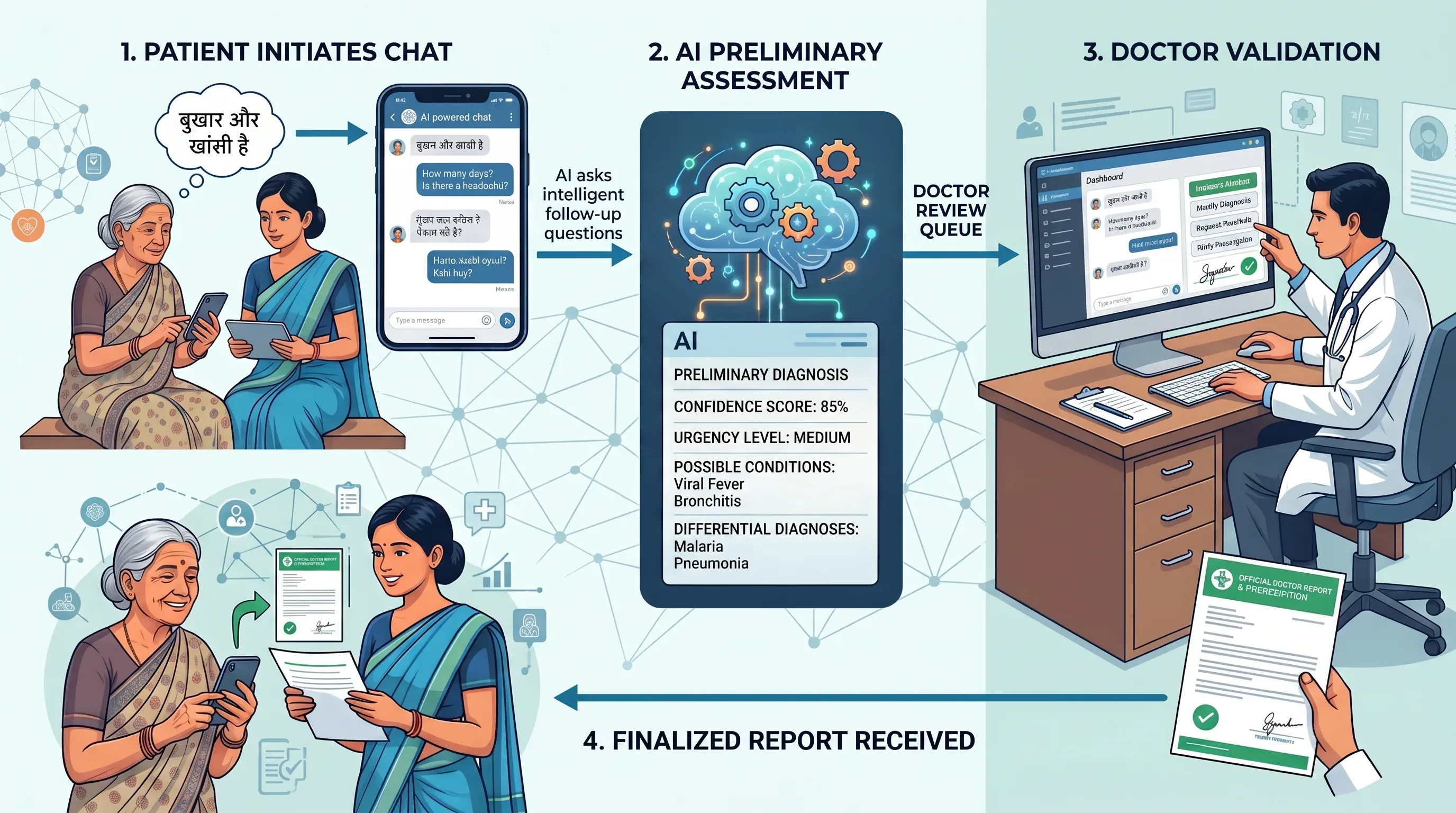
Figure 2: End-to-end patient journey, from symptom description through AI diagnosis to doctor-reviewed prescription.
At its heart, the platform works as a bridge between patients and doctors. A patient — or an ASHA worker on their behalf — opens the app and starts a conversation. They describe their symptoms in their own language. The AI asks intelligent follow-up questions to gather more context. When enough information has been collected, the AI generates a structured preliminary diagnosis — with a confidence score, urgency level, possible conditions and differential diagnoses.
This diagnosis doesn’t go directly to the patient. It enters a doctor review queue, where a qualified physician examines the AI’s assessment alongside the full patient conversation. The doctor can approve it, modify it, request more information from the patient, and write a complete prescription. Only then does the patient receive a finalized report.
What makes this platform different from a simple chatbot is the layered design built around two key principles:
Accessibility — the system supports multiple languages, image attachments, and a proxy role for ASHA workers, ensuring even the least connected communities can use it.
Responsibility — no diagnosis is ever final without a doctor’s approval. The AI assists; it never decides.
This MVP demonstrates that with the right design, AI can meaningfully reduce the gap between rural patients and qualified medical care — not by replacing doctors, but by making every patient’s journey to a diagnosis faster, smarter, and more informed.
System Architecture
High-Level Architecture
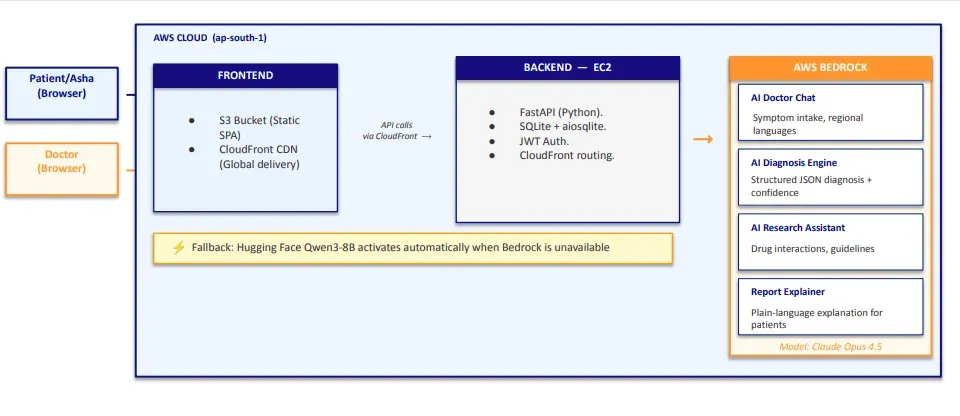
Figure 3: High-level architecture showing the SPA frontend on S3, FastAPI backend on EC2, CloudFront CDN, and AWS Bedrock AI integration.
The platform follows a client-server architecture. The frontend is a Single-Page Application (SPA) hosted on AWS S3, and the backend is a FastAPI application running on an AWS EC2 instance. All data is stored in a SQLite database on the EC2 instance.
The frontend is a single index.html file that uses hash-based routing to render different views depending on the user’s role — patients, doctors, and ASHA workers each get a completely different dashboard experience, all without ever reloading the page. CloudFront sits in front of S3 and serves the frontend from the edge location closest to the user, ensuring fast load times and HTTPS by default.
The frontend communicates with the backend via REST API calls routed through CloudFront. The backend handles all business logic — authentication, chat sessions, diagnosis generation, and doctor review — and calls AWS Bedrock whenever AI processing is needed.
AI Services on AWS Bedrock
The platform uses Claude Opus 4.5 on AWS Bedrock for four distinct AI capabilities:
| AI Service | Purpose |
|---|---|
| AI Doctor Chat | Conversational symptom intake in regional languages |
| AI Diagnosis Engine | Generates structured JSON diagnosis with confidence score |
| AI Research Assistant | Provides drug interactions, guidelines and research support for doctors |
| Report Explainer | Explains the doctor’s final report in plain language for patients |
If Bedrock is unavailable, the system automatically falls back to Hugging Face Qwen3-8B to ensure continuity.
Authentication
The platform uses JWT (JSON Web Tokens) for authentication. On login or registration, the server generates a JWT token containing the user’s user_id (SQLite primary key), role, and name, signed using the HS256 algorithm and valid for 24 hours. Every subsequent API request includes this token in the Authorization: Bearer <token> header, which the backend verifies on every protected route before processing the request.
Tech Stack Overview
| Layer | Technology |
|---|---|
| Frontend | Vanilla JS, HTML, CSS (hosted on AWS S3) |
| CDN | AWS CloudFront (global delivery, HTTPS) |
| Backend | FastAPI (Python), running on AWS EC2 |
| Database | SQLite via aiosqlite |
| AI — Chat & Diagnosis | Claude Opus 4.5 via AWS Bedrock |
| AI — Fallback | Hugging Face Qwen3-8B via aisuite |
| Authentication | JWT (HS256, 24-hour expiry) |
| File Storage | Local filesystem on EC2 |
| AI Client | AWS Boto3 + aisuite |
The Three Roles: Who Uses the System?
The platform is built around three distinct user roles, each with their own dedicated interface and workflow. Every role is authenticated via JWT and has access only to the routes and data relevant to them.
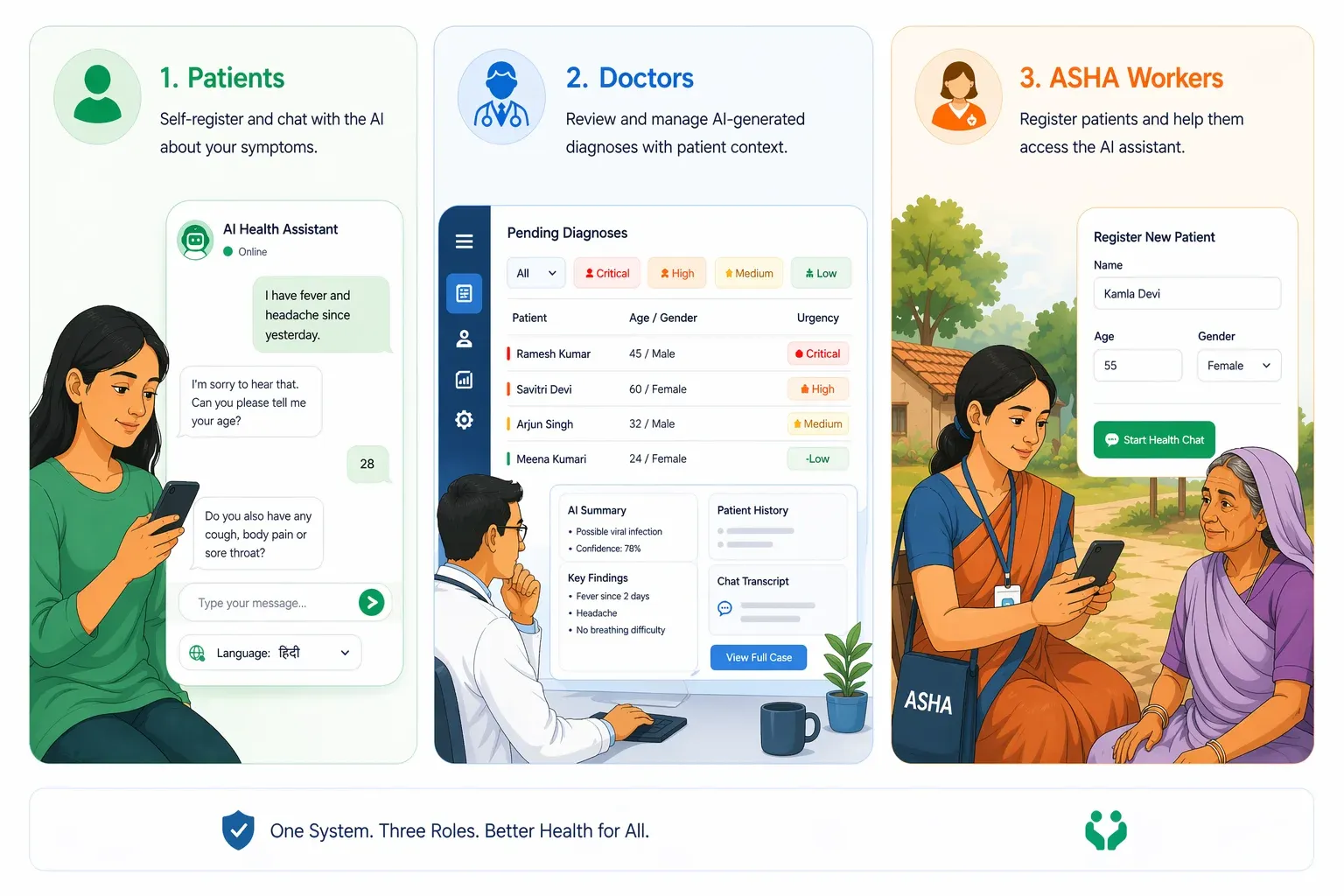
Figure 4: Dashboard views for the three user roles — patient, doctor, and ASHA worker — each with a dedicated interface tailored to their workflow.
Patients
Patients are the primary beneficiaries of the system. A patient self-registers with their name, email, age, and gender, and can immediately start a chat session with the AI. They describe their symptoms conversationally — in their preferred language — and the AI asks intelligent follow-up questions to gather more context. Once enough information has been collected, the patient requests a diagnosis, which is then queued for doctor review.
After the doctor finalizes the report, the patient can:
- View their complete diagnosis and prescription.
- Read the report in their preferred language.
- Chat with the AI to understand the report in simple, plain language.
- Respond to any follow-up questions the doctor may have.
Doctors
Doctors are the human oversight layer of the system. They log in to a dedicated dashboard where they can see a prioritized queue of pending diagnoses — sorted by urgency (critical → high → medium → low).
For each case, the doctor has access to:
- The full patient-AI conversation.
- The AI’s preliminary diagnosis, confidence score, and urgency level.
- The doctor-patient feedback thread.
- An AI Research Assistant to look up drug interactions, treatment guidelines, and differential diagnoses.
The doctor can then either:
- Finalize the diagnosis — writing a complete prescription with medications, dosage instructions, follow-up date, diet and lifestyle advice, and additional instructions.
- Request more information — sending a message to the patient and putting the case on hold until they respond.
- Doctors also receive notifications — for example, when a patient deletes a report that was under review.
Asha Workers
ASHA (Accredited Social Health Activists) workers are India’s frontline community health workers. Many rural patients do not have smartphones or the digital literacy to use the platform directly. ASHA workers act as a proxy — they register on behalf of patients, enter the patient’s details (name, age, gender, medical history), and conduct the chat session on their behalf.
The ASHA worker flow mirrors the patient flow almost exactly:
- Start a case for a patient.
- Chat with the AI on the patient’s behalf.
- Submit the case for diagnosis and doctor review.
- Respond to doctor feedback on the patient’s behalf.
- View the completed report and explain it to the patient.
This role is critical to ensuring the platform reaches the patients who need it most — those without direct access to technology.
The Diagnostic Workflow: End to End
The diagnostic workflow is the core of the platform. It is designed as a sequential, state-driven pipeline — each report moves through a series of statuses, and each status determines what actions are available to the patient, doctor, or ASHA worker.
Report Status Flow
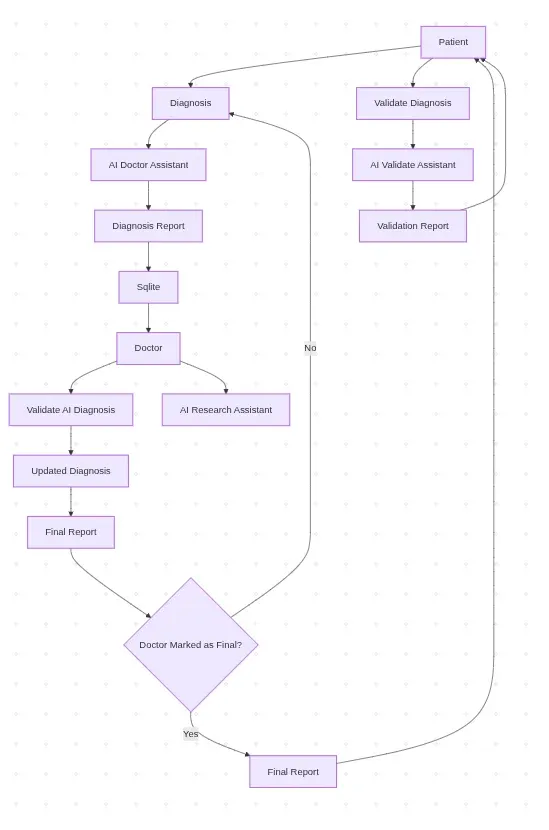
Figure 5: State-driven diagnostic pipeline showing how a report progresses from initial chat through doctor review to a finalized prescription.
Every diagnosis report has a status that reflects exactly where it is in the pipeline at any given moment.
Step 1: Starting a Chat Session (chatting)
The workflow begins when a patient or ASHA worker starts a new chat session. A shell diagnosis report is created in the database with a status of chatting. The patient’s background information — age, gender, medical history, current medications, and preferred language — is captured upfront and stored with the session.
Any previously abandoned chatting sessions are automatically cleaned up before a new one is created, ensuring there are no stale records.
Step 2: Conversational Symptom Collection (chatting)
The patient describes their symptoms in a free-form conversational interface. The AI — powered by Claude Opus 4.5 — asks intelligent follow-up questions to gather more context. The patient can also attach images (e.g., photos of a rash or a wound) which can be processed alongside the text.
Every message — both patient and AI — is saved to the chat_messages table, building a complete transcript of the conversation.
Step 3: AI Diagnosis Generation (pending_review)
When the patient feels the AI has enough information, they request a diagnosis. The full chat transcript is sent to Claude Opus 4.5 which generates a structured JSON diagnosis containing:
- Primary condition — the most likely diagnosis
- Confidence score — how confident the AI is (0.0 to 1.0)
- Urgency level — low / medium / high / critical
- Differential diagnoses — other possible conditions
- Description — a plain-language explanation of the diagnosis
If the patient’s preferred language is not English, all fields are also translated into their language and stored alongside the English version. The report status moves to pending_review and enters the doctor queue.
Step 4: Doctor Review (pending_review -> feedback_requested / completed)
The report appears in the doctor’s queue, prioritized by urgency. The doctor reviews the full case — patient conversation, AI diagnosis, and any prior feedback — and has two options:
Option A — Request Feedback:
The doctor sends a message to the patient asking for more information. The report status moves to feedback_requested. The doctor’s message is automatically translated into the patient’s preferred language.
Option B — Finalize:
The doctor approves or modifies the diagnosis and writes a complete prescription. The report status moves to completed.
Step 5: Patient Feedback Loop (feedback_requested -> pending_review)
If the doctor requested more information, the patient is notified and responds via the feedback thread. Their response is automatically translated to English for the doctor. The report moves back to pending_review and the doctor reviews again.
This loop can repeat as many times as needed until the doctor is satisfied.
Step 6: Finalized Report (completed)
Once the doctor finalizes the report, the patient receives a complete prescription including:
- Final diagnosis
- Prescribed medications
- Dosage instructions
- Follow-up date
- Diet and lifestyle advice
- Additional instructions
- Doctor’s comments
All fields are available in both English and the patient’s preferred language.
Step 7: Understanding the Report
After the report is finalized, the patient can open a dedicated Report Explainer chat — powered by Claude Opus 4.5 — to ask questions about their diagnosis and prescription in plain, simple language. This is especially useful for patients who may not understand medical terminology and have a second opinion.
The AI Layer: How Diagnosis Works
The AI layer is the backbone of the platform. It is built on AWS Bedrock using Claude Opus 4.5 as the primary model, with Hugging Face Qwen3-8B as an automatic fallback. The AI serves four distinct purposes — each handled by a dedicated function in the codebase.
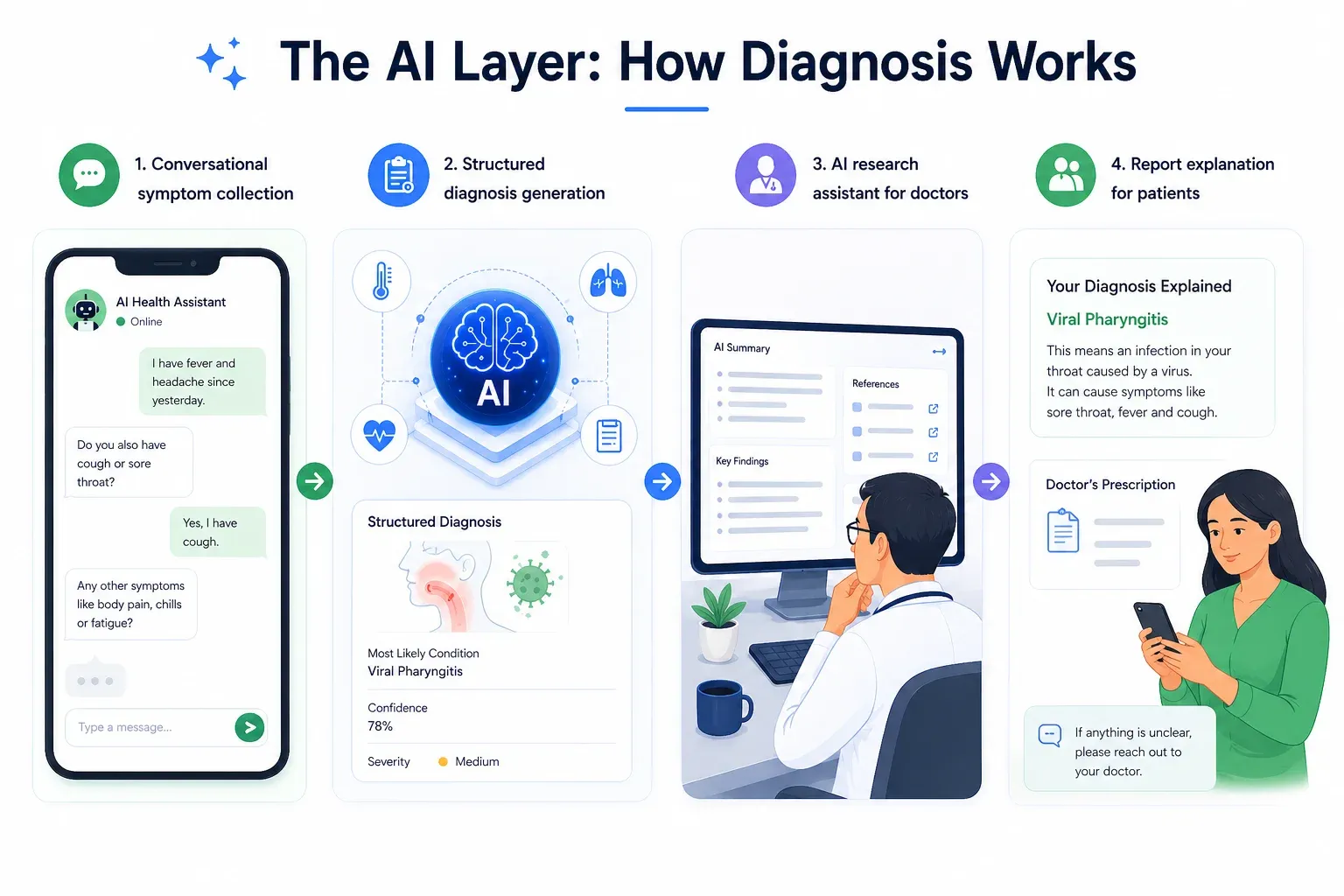
Figure 6: Overview of the four AI services — symptom collection, diagnosis generation, doctor research assistant, and report explainer — all powered by Claude Opus 4.5 on AWS Bedrock.
1. Conversational symptom collection
The first job of the AI is to gather information, not diagnose. When a patient sends their first message, the AI acts as an empathetic medical assistant — asking targeted follow-up questions to build a complete picture of the patient’s condition.
The system prompt is carefully constructed for each session, incorporating:
- The patient’s preferred language — the AI is instructed to respond entirely in that language.
- The patient’s background — age, gender, medical history, and current medications are injected into the system prompt so the AI never asks for information already on file.
- Image context — if the patient attaches an image, it is converted to base64 and sent to Claude alongside the text message.
- Voice input — patients can speak their symptoms directly using the browser’s native Web Speech API (STT). The speech is converted to text in real time and sent as a normal text message to the backend. AI responses can also be read aloud via Text-to-Speech (TTS) using the browser’s SpeechSynthesis API — making the platform accessible to patients with low literacy. Both features work entirely on the frontend with no server-side audio processing.
2. Structured Diagnosis Generation
When the patient requests a diagnosis, the entire chat transcript is compiled and sent to Claude Opus 4.5 with a structured diagnosis system prompt. The AI is instructed to return a strict JSON response containing:
{
"primary\_condition": "Viral Fever",

"confidence": 0.72,

"urgency": "medium",

"differential\_diagnoses": "Dengue Fever, Malaria, Typhoid Fever",

"description": "The combination of fever symptoms suggests a viral infection...",

"primary\_condition\_local": "...",

"recommended\_actions\_local": "...",

"differential\_diagnoses\_local": "...",

"description\_local": "..."
}
The _local fields contain translations of the diagnosis into the patient’s preferred language, generated in the same API call — avoiding a separate translation step.
3. AI Research Assistant for Doctors
When reviewing a case, doctors have access to a conversational AI Research Assistant — also powered by Claude Opus 4.5. Unlike the patient-facing chat, the research assistant is given the full case context as its system prompt, including:
- The complete patient-AI conversation
- The AI’s preliminary diagnosis
- The doctor-patient feedback thread
This means the doctor can ask natural, context-aware questions like:
- “What are the drug interactions for this prescription?”
- “What does the latest WHO guideline say about this condition?”
- “What are the differential diagnoses I should consider?”
And the AI responds with full awareness of the specific case — not generic medical information.
4. Report Explainer
Once a doctor finalizes a report, patients can open a Report Explainer chat to understand their diagnosis and prescription in simple, plain language. The system prompt is built around the full final report — condition, medications, dosage, follow-up instructions — and the AI is instructed to explain it in the patient’s preferred language in a way that is easy for a non-medical person to understand.
Fallback Strategy
If AWS Bedrock is unavailable for any reason, the system automatically falls back to Hugging Face Qwen3-8B via the aisuite client. If the Hugging Face API key is also unavailable, the system falls back to hardcoded demo responses — ensuring the platform never completely breaks, even in a demo environment.
Key Features
1. Multi - Language Support
The platform supports 11 Indian languages out of the box:
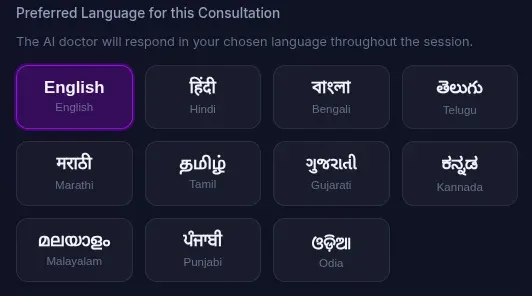
Figure 7: Language selection interface supporting 11 Indian languages, enabling patients to consult in their native tongue.
Before starting a consultation, the patient selects their preferred language. The AI then responds entirely in that language for the entire session. When the doctor finalizes a prescription, all fields — diagnosis, medications, dosage instructions, diet advice, and additional instructions — are automatically translated into the patient’s preferred language and stored alongside the English version.
2. Voice Input (Speech-to-Text)
Patients and ASHA workers can speak their symptoms directly using the browser’s native Web Speech API. The spoken input is converted to text in real time and placed into the chat input — no typing required.
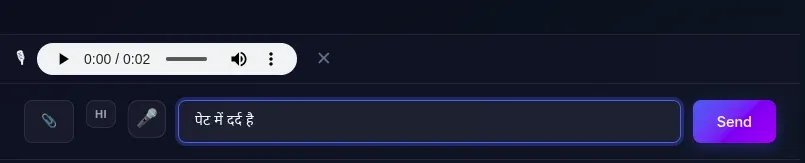
Figure 8: Voice input interface with speech-to-text in the patient’s language and a WhatsApp-style audio preview before sending.
The voice recognition is set to the patient’s preferred language — so a Hindi-speaking patient can speak in Hindi and it will be correctly transcribed. There is also a language toggle button in the chat that lets users switch between their preferred language and English for voice input on the fly.
After recording, a WhatsApp-style audio preview bar appears so the patient can listen to their recording before sending it. If they are not satisfied, they can discard it and re-record.
3. Text-to-Speech
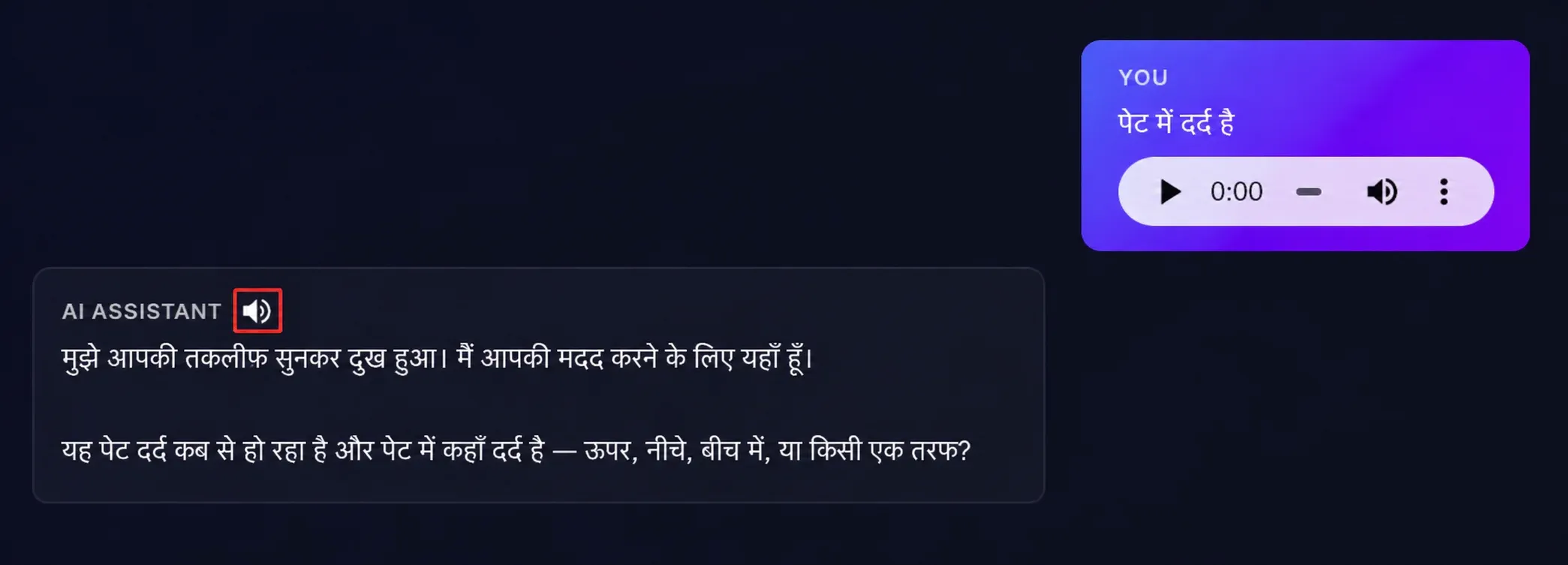
Figure 9: Text-to-speech feature that reads AI responses aloud in the patient’s preferred language, improving accessibility for low-literacy users.
Every AI response in the chat has a speaker button that reads the response aloud using the browser’s SpeechSynthesis API — making the platform accessible to patients with low literacy. The speech is read in the patient’s preferred language at a natural pace, with markdown and HTML stripped out for cleaner audio. Clicking the button again stops the speech immediately.
4. File Uploads and Attachments
Patients can attach files to their chat messages — useful for sharing photos of rashes, wounds, reports, or prescriptions. Supported formats include:
- Images: JPG, webp, GIF, WebP (processed by Claude Vision)
- Documents: PDF, DOC, DOCX
Files are capped at 10 MB and stored on the EC2 filesystem with unique randomly generated names to avoid conflicts. Image attachments are rendered inline in the chat; documents appear as clickable download links. Attachments are supported in both the patient chat and the doctor-patient feedback thread.
5. Prescription Download
Once a doctor finalizes a report, both the patient and the doctor can download a formatted prescription PDF.
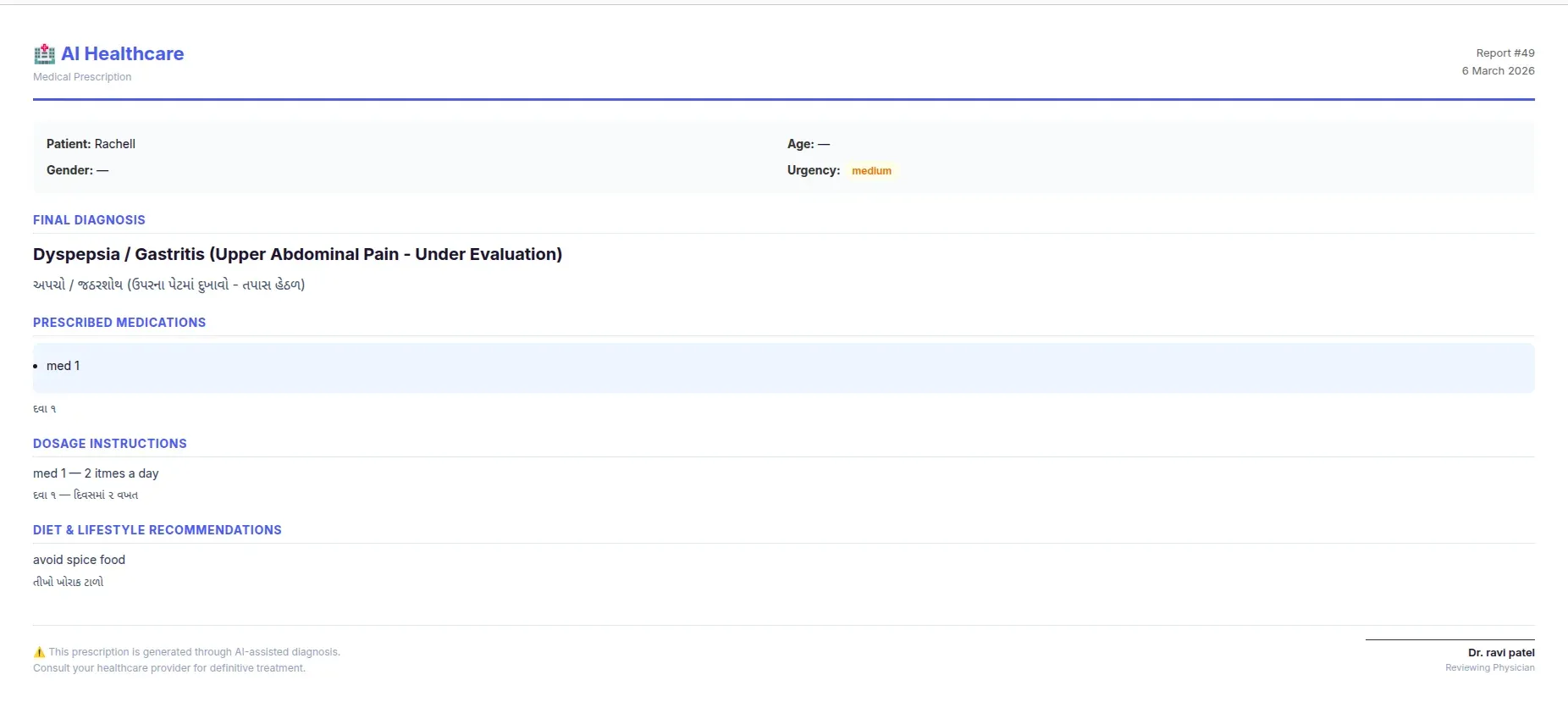
Figure 10: Sample prescription PDF generated once a doctor finalizes the report, including diagnosis, medications, dosage, diet advice, and a doctor signature block.
The prescription is generated client-side as a print-ready HTML page and includes:
- Patient details (name, age, gender, urgency).
- Final diagnosis (in English and local language if applicable).
- Prescribed medications with dosage instructions.
- Diet and lifestyle recommendations..
- Follow-up date.
- Doctor’s notes.
- Doctor’s signature block.
6. Priority Queue for Doctors
The pending reports queue is not first-come-first-served. Reports are sorted by urgency level — critical cases always appear at the top, followed by high, medium, and low urgency. This ensures that the most serious cases are never buried under routine consultations.
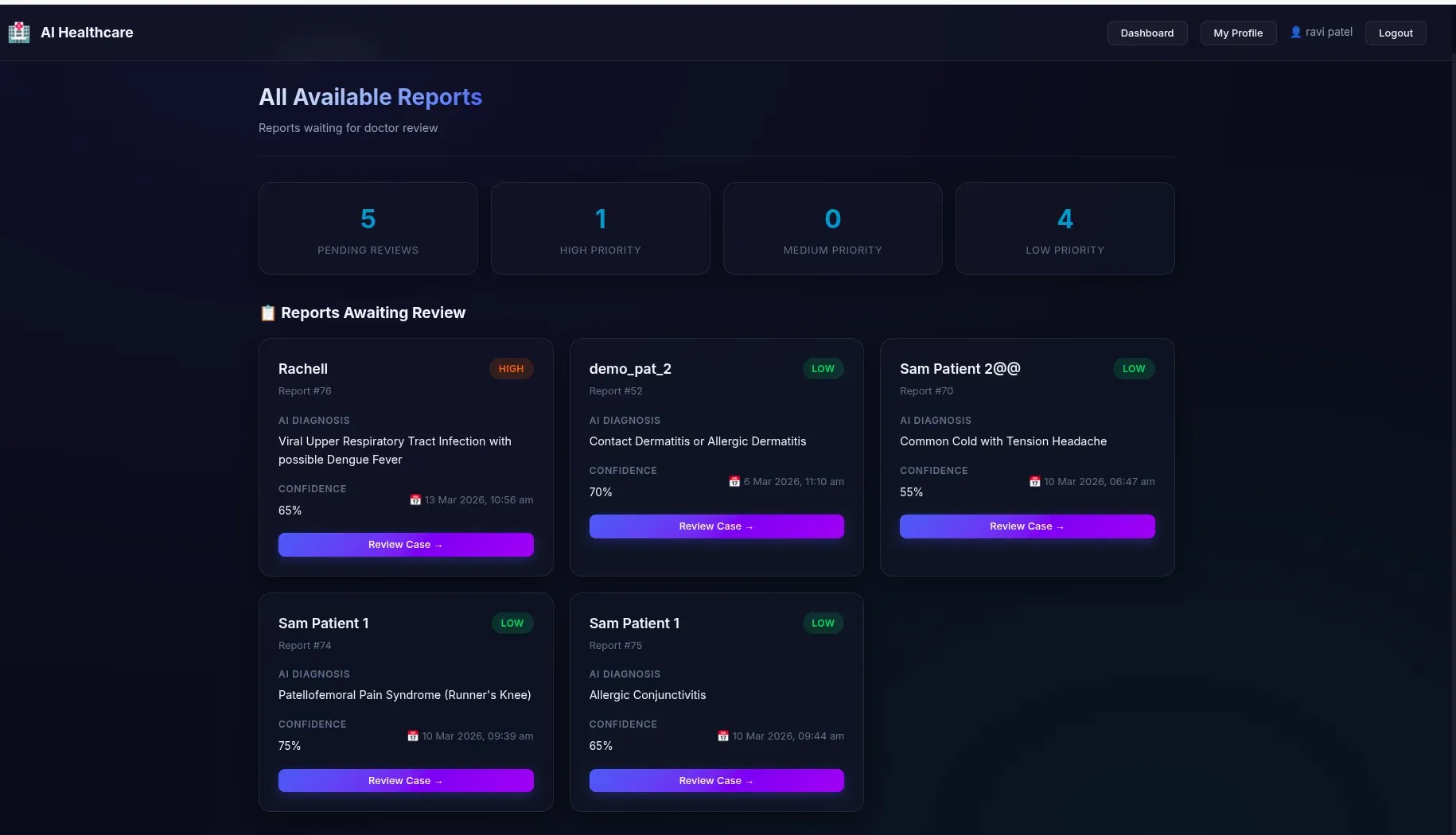
Figure 11: Doctor’s priority queue sorted by urgency — critical cases surface at the top so serious cases are never buried under routine consultations.
7. Report Filtering
Both the patient dashboard and the doctor dashboard support filter pills to quickly find reports by status:
Patient filters: All / Completed / In Review / Waiting for a Doctor.
Doctor filters: All / Completed / In Progress / Awaiting Patient Response.
Limitations and The Road Ahead
Every MVP carries the weight of decisions made under time and resource constraints. This platform is no exception. Here we honestly document what works, what doesn’t, and where we’d take this next.
Current Security Gaps
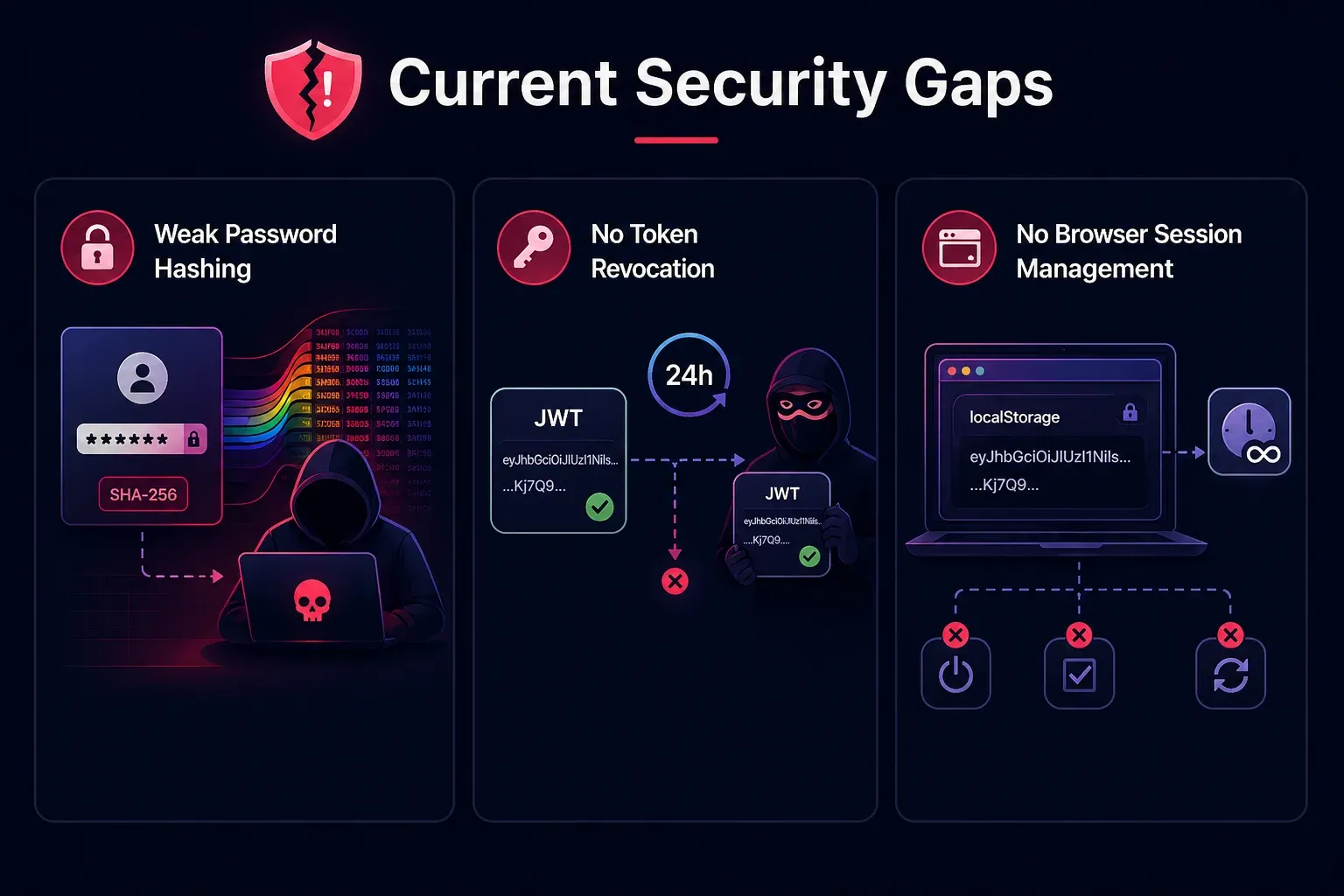
Figure 12: Current security gaps in the MVP — covering password hashing, JWT token revocation, and browser session management.
SHA-256 password hashing without salt
Passwords are hashed using plain SHA-256 — which is fast, deterministic, and vulnerable to rainbow table attacks. In production, this must be replaced with a slow, salted hashing algorithm like bcrypt or argon2.
No JWT token revocation
Once issued, a JWT token is valid for 24 hours with no way to invalidate it early. If a token is stolen, there is no mechanism to revoke it. Production systems typically address this with a token blacklist or short-lived tokens combined with refresh tokens.
No browser session management
The JWT token is stored in localStorage and never expires client-side — it persists across browser sessions until the 24-hour server-side expiry. There is no automatic logout on inactivity, no “remember me” toggle, and no token refresh mechanism.
Architectural Limitations
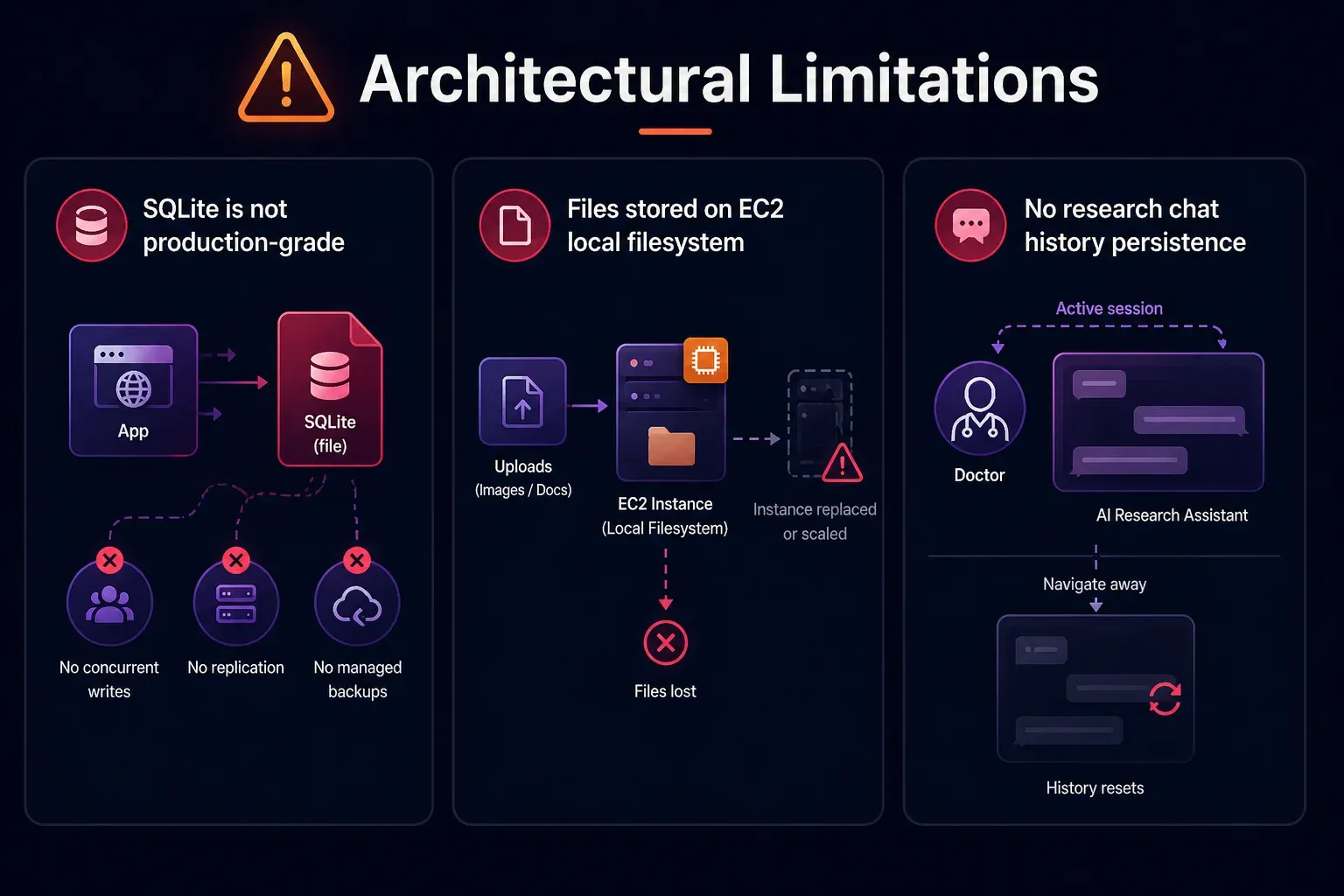
Figure 13: Architectural limitations of the MVP — SQLite as the database, local file storage on EC2, and no persistence for the research chat history.
SQLite is not production-grade
SQLite works well for an MVP with low concurrent traffic. But it is a file-based database with no support for concurrent writes, no replication, and no managed backups.
Files stored on EC2 local filesystem
Uploaded images and documents are stored directly on the EC2 instance’s filesystem. If the instance is replaced or scaled, all uploaded files are lost. Using Amazon S3 for uploads is a better solution.
No research chat history persistence
The AI Research Assistant chat history is not persisted in the database — it resets every time the doctor navigates away from the review page
Unimplemented Features
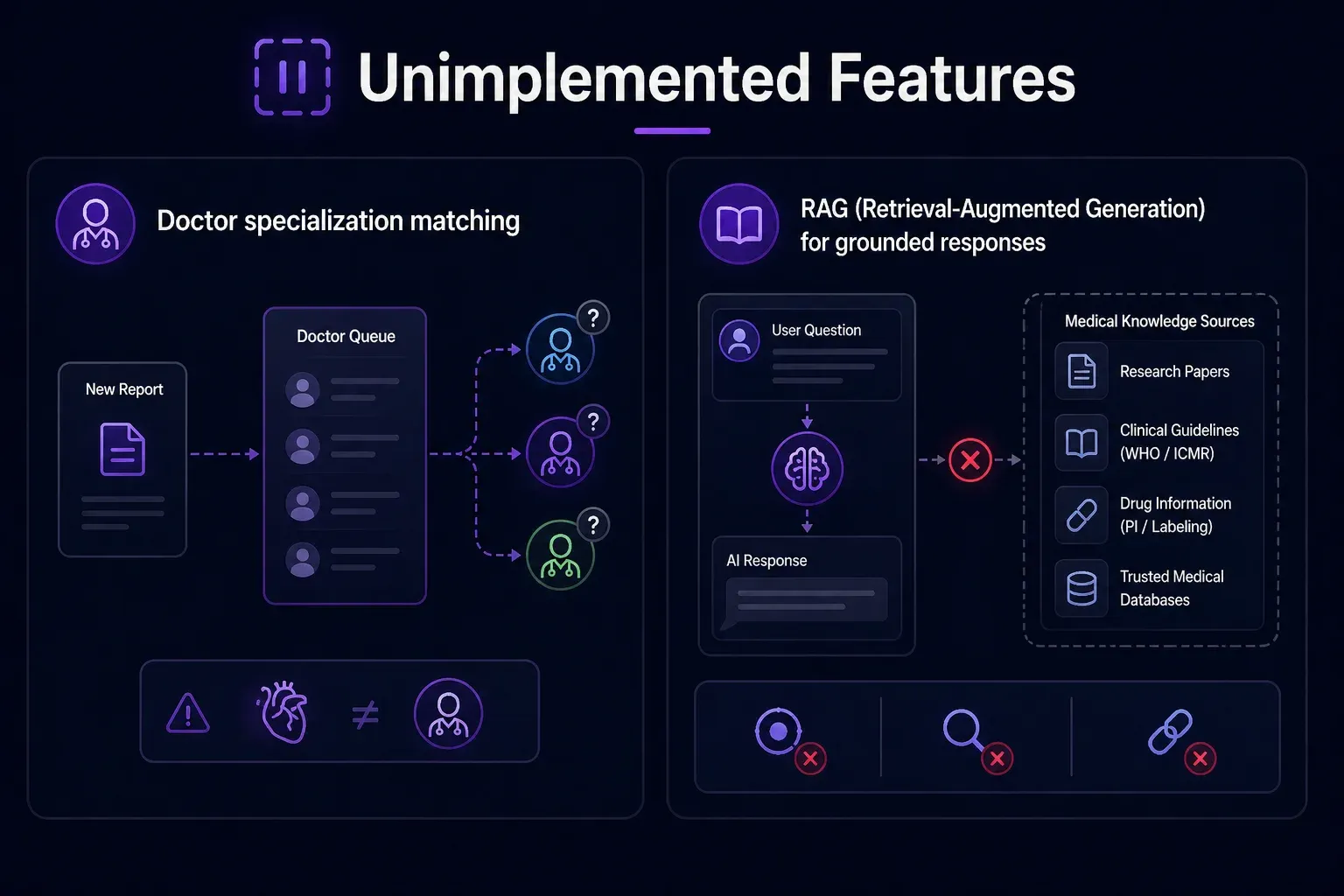
Figure 14: Features planned but not yet implemented, including doctor specialization routing and a RAG layer for grounded medical responses.
Doctor specialization matching
Reports are assigned to whichever doctor picks them up from the queue — there is no matching logic to route a cardiology case to a cardiologist.
RAG (Retrieval-Augmented Generation) for grounded responses
Both the AI Research Assistant and the Report Explainer currently rely entirely on Model’s parametric knowledge, with no access to verified, up-to-date medical literature. There is no retrieval layer backed by a curated medical knowledge base. This means:
- The Research Assistant cannot cite specific studies, drug package inserts, or current WHO/ICMR guidelines.
- The Report Explainer cannot ground its explanations in verified medical references.
- Responses, while generally accurate, cannot be traced back to a source.
The Road Ahead
If this platform were to move beyond MVP, here is what we would prioritize:
- Replace SQLite with PostgreSQL for production-grade concurrency and reliability.
- Move file storage to S3 to decouple uploads from the EC2 instance
- Implement bcrypt password hashing and proper JWT refresh token flow
- Add doctor specialization routing — matching cases to the right specialist
- Persist research chat history — so doctors can refer back to prior research conversations
- Analytics dashboard — tracking diagnosis accuracy, doctor override rates, and AI confidence distributions over time
- Doctor credibility verification — Currently, any user can register as a doctor by simply providing a registration number — there is no verification that the number is valid, active, or belongs to the person registering. In production, this needs a proper verification pipeline.
Conclusion
Building this platform was an exercise in asking a simple but profound question: what is the minimum viable system that can meaningfully improve healthcare access for someone in rural India?
The answer, as it turns out, is not a replacement for doctors. It is a smarter, more accessible path to them.
By combining conversational AI, multilingual support, voice input, image understanding, and a structured human-in-the-loop review workflow, we built a system that:
- Lets patients describe their symptoms in their own language — by voice or text.
- Gives doctors a structured, AI-generated starting point rather than a blank page.
- Ensures ASHA workers — India’s most critical last-mile health resource — have a tool that works for them.
- Delivers finalized prescriptions in the patient’s language, with a built-in explainer so they actually understand what they’ve been prescribed.
The system is not production ready, the security gaps are real, the database is not built for scale, and several features remain on the roadmap. But as an MVP, it demonstrates something important: the technology to meaningfully bridge India’s rural healthcare gap exists today.
The hardest problems ahead are not technical. They are trust, adoption, regulatory compliance, and the cultural nuance of healthcare in hundreds of different communities across India. But the foundation is here.
If you’d like to explore the codebase
Github: https://github.com/infocusp/InfoAgents
Demo Video: InfoAgents_DEMO_v1.mp4
Any of your thoughts are welcomed— whether you’re a developer, a healthcare professional, or someone who has experienced the gap this platform is trying to close firsthand. The conversation is just getting started.