- workflow-automation
- data-engineering
Orchestrating Cloud Services with GCP Workflows

Introduction
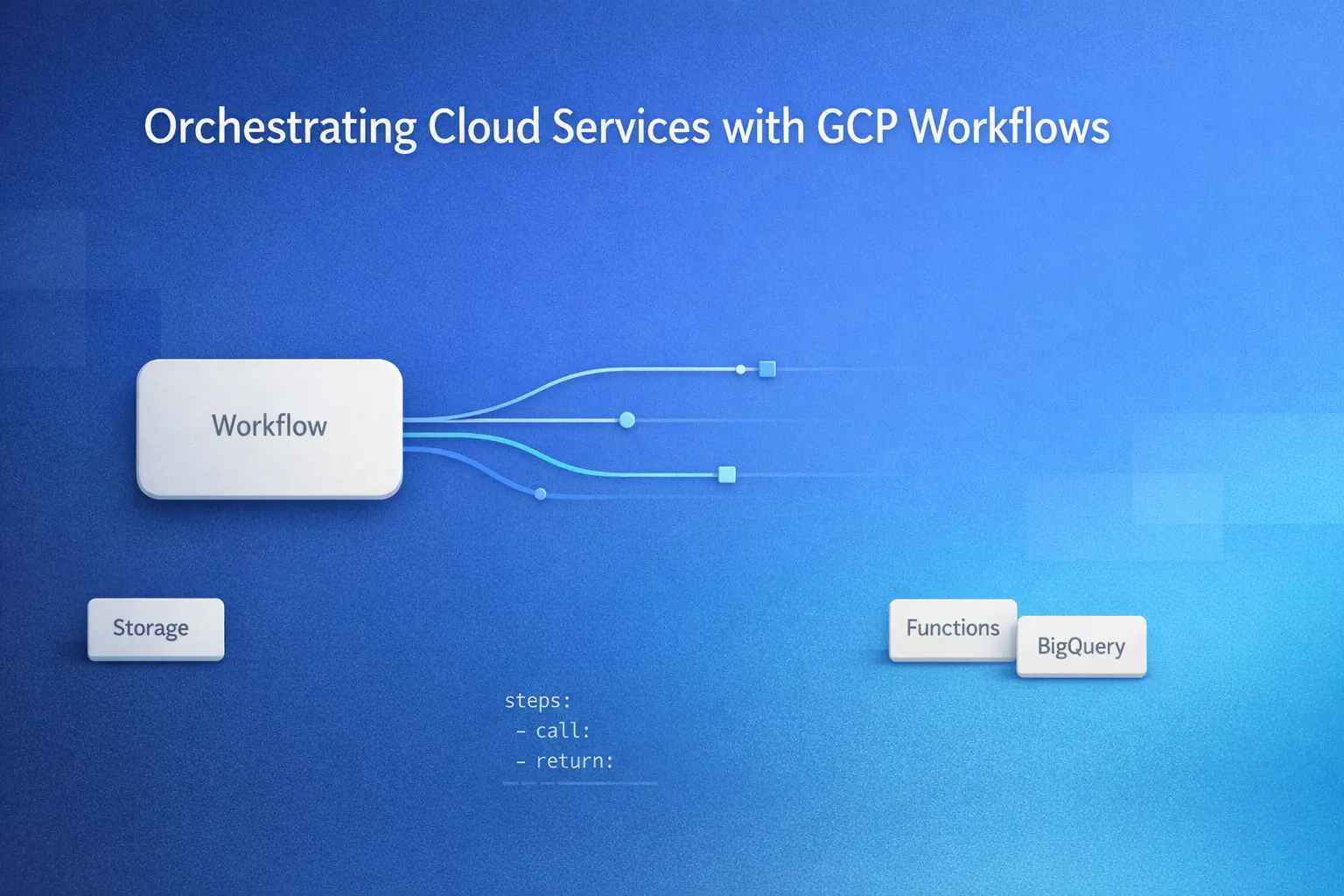
To scale your entire application with multiple cloud services, is often complicated. This is where Google Cloud Workflows comes into picture to combine all the services. It’s a serverless orchestration service that lets us to connect cloud services, apis as well as custom logic using JSON or YAML definitions.
Workflows doesn’t compute the task like compute engines do. Instead, it delegates to the services such as Cloud Functions, Dataflow, Cloud Run or Batch, at the same time, we can focus on control flow, retries and monitoring.
In this blog, we’ll cover:
- Why use GCP Workflows
- Use cases (and when not to use it)
- Comparison with Cloud Composer (Airflow)
- Core concepts and YAML examples
- Advanced patterns (loops, error handling, branching)
- Best practices, and more
Highlights: GCP Workflows is cost-effective, scalable, and fully managed — making it perfect for modern cloud-native architectures.
Why Use Google Cloud Workflows?
Here are the main reasons why engineering teams choose Workflows:
- Serverless – Fully managed, no servers to maintain.
- Reliable – Built-in retries, error handling, and long-running workflows.
- Scalable – Works for small automation tasks to complex enterprise flows.
- Cost-Effective – Pay per step execution; no idle cost.
Typical Use Cases
Workflows can power automation in multiple scenarios:
- Multi-service orchestration → Example: GCS file upload → Cloud Function processing → BigQuery storage.
- API aggregation → Aggregate responses from multiple APIs with timeout handling.
- Event-driven pipelines → Resize images or extract metadata on file upload.
- Scheduled jobs → Automate daily report generation.
- Human-in-the-loop approvals → Pause workflows for manual sign-off.
When Not to Use Workflows
While powerful, Workflows isn’t a one-size-fits-all solution. Avoid it for:
- High-performance computing - Use Dataflow or Batch.
- Long-running processes - Workflows max out at 1 year.
- Real-time streaming - Use Pub/Sub + Dataflow instead.
Workflows vs Cloud Composer (Airflow)
| Feature | Cloud Workflows | Cloud Composer (Airflow) |
|---|---|---|
| Primary Use Case | Orchestration of APIs & GCP services | Data pipeline orchestration with Python DAGs |
| Execution Model | Step-by-step flow with conditionals | Directed Acyclic Graph (DAG) |
| Best For | Lightweight workflows, microservice orchestration | Complex dependencies & custom logic |
| Startup Time | Near-instant | Longer (scheduler overhead) |
| Management | Fully managed, serverless | Requires environment tuning |
| Integration | HTTP APIs, GCP services | Batch processing, SQL orchestration |
| Language | YAML / JSON | Python |
| Cost | Pay-per-step | Always-on environment |
Related Reading: Getting Started with Apache Airflow on GCP
Core Concepts of GCP Workflows
- Workflow → Declarative script in YAML/JSON with sequential steps.
- Steps → Each named action performs a call, assignment, or condition check.
- Return → Defines the workflow’s output.
Minimal Example
main:
  steps:
    - first_step:
        assign:
          - message: "Hello, GCP Workflows!"
    - return_message:
        return: ${message}
This workflow assigns a message to a variable and returns it.
Connecting to Google Cloud Services
Workflows integrates seamlessly with:
- Cloud Functions – Trigger event-driven functions.
- Cloud Run – Invoke containerized services.
- BigQuery – Run queries and insert results.
- Pub/Sub – Publish messages.
- Cloud Storage – Read/write files.
It can also call external APIs, Dataflow jobs, or Batch workloads via REST API.
Example of workflows to orchestrate services
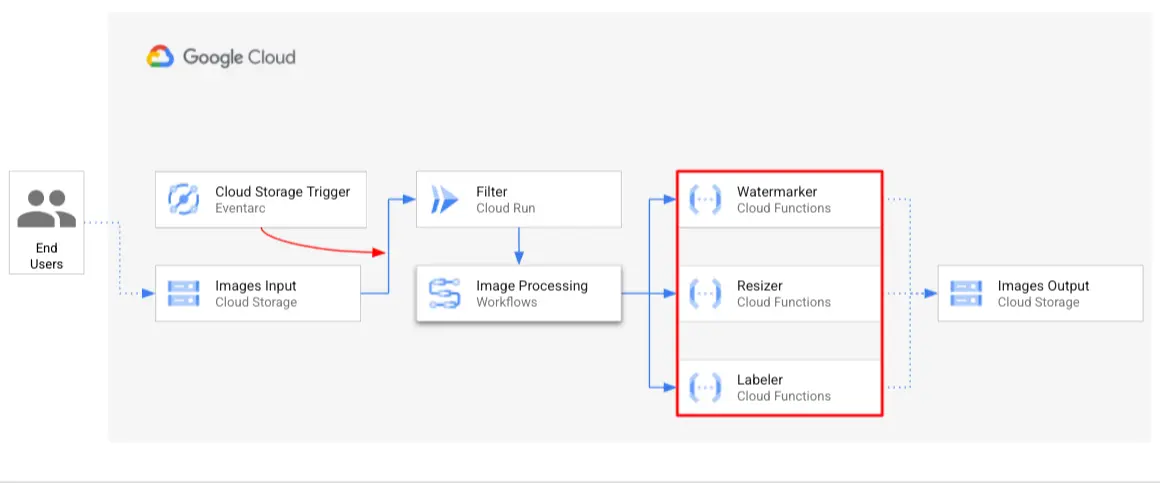
This diagram demonstrates how workflows orchestrates an image processing pipeline. When user uploads the image file to the cloud storage, an Eventarc trigger invokes a Cloud Run service. Then the workflows connects cloud functions for different task like watermarking, resizing and labeling to the image. At last, the final image will be stored to the cloud storage.
Workflows act as a central orchestrator, which ensures each processing step is executed in the right order.
For reference, you can create this workflows using the below yaml file
main:
  params: [args]
  steps:
    - init:
        assign:
          - bucket: ${args.bucket}
          - file: ${args.file}
          - urls: ${args.urls}
          - gcsUri: ${"gs://" + bucket + "/" + file}
    - logFile:
        call: sys.log
        args:
          text: ${gcsUri}
    - label:
        call: http.post
        args:
          url: ${urls.LABELER_URL}
          auth:
            type: OIDC
          body:
            bucket: ${bucket}
            file: ${file}
        result: labelResponse
    - resize:
        call: http.post
        args:
          url: ${urls.RESIZER_URL}
          auth:
            type: OIDC
          body:
            bucket: ${bucket}
            file: ${file}
        result: resizeResponse
    - watermark:
        call: http.post
        args:
          url: ${urls.WATERMARKER_URL}
          auth:
            type: OIDC
          body:
            bucket: ${resizeResponse.body.bucket}
            file: ${resizeResponse.body.file}
            labels: ${labelResponse.body.labels}
        result: watermarkResponse
    - final:
        return:
          label: ${labelResponse.code}
          resize: ${resizeResponse.code}
          watermark: ${watermarkResponse.code}
Example: HTTP Call to Cloud Run
main:
  steps:
    - call_function:
        call: http.post
        args:
          url: "https://your-cloud-run-function-url"
          body:
            input: "data"
        result: function_output

    - log_step:
        call: sys.log
        args:
          text: ${function_output}
          severity: "INFO"
This sends data to a Cloud Run service and logs the response.
Getting Started with Workflows
Prerequisites
- Google Cloud Project with billing enabled
- IAM roles:
workflows.admin,workflows.invoker - Enable the Workflows API
Enable workflows API using gcloud
gcloud services enable workflows.googleapis.comDeploy via Console
- Open Workflows in Cloud Console
- Click Create Workflow
- Paste YAML definition
- Click Deploy
Deploy via CLI
gcloud workflows deploy my-workflow \
  --source=my_workflow.yaml \
  --location=us-central1
Execute Workflow
gcloud workflows execute my-workflow --location=us-central1Simple Workflows
Hello World
main:
  steps:
    - assign_message:
        assign:
          - message: "Hello World!"
    - return_output:
        return: ${message}
A simple workflow that returns a static message.
External API Call
main:
  steps:
    - fetch_data:
        call: http.get
        args:
          url: "https://api.chucknorris.io/jokes/random"
        result: response
    - return_joke:
        return: ${response.body.value}
Fetches a random joke from a public API and returns it.
Advanced Workflow Patterns
Conditional Logic
main:
  params: [input]
  steps:
    - checkAge:
        switch:
          - condition: ${input.age < 18}
            next: returnMinor
          - condition: ${input.age >= 18 and input.age < 65}
            next: returnAdult
          - condition: ${input.age >= 65}
            next: returnSenior
    - returnMinor:
        return: ${"You are a minor age " + input.age }
    - returnAdult:
        return: ${"You are an adult age " + input.age}
    - returnSenior:
        return: ${"You are a senior age " + input.age}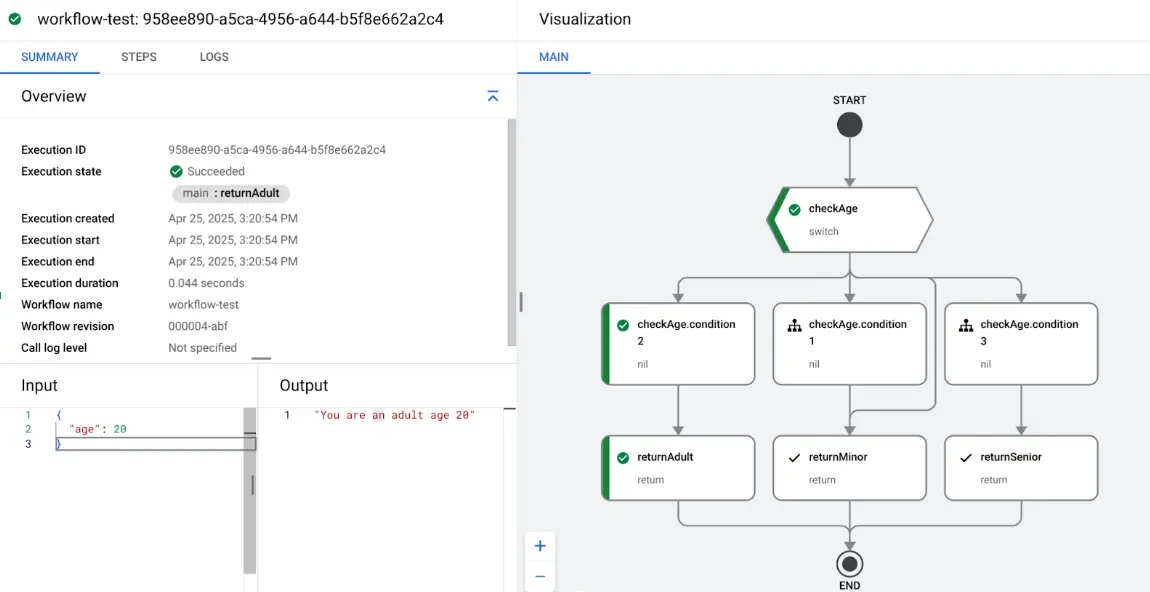
Uses a `switch` statement to control workflow logic based on the `input.age` value. For example, if the input is `{ "age": 20 }`, the workflow will return: “You are an adult age 20”.
While Loop
main:
  steps:
    - initialize:
        assign:
          - counter: 5
          - result: []
    - loop_condition_check:
        switch:
          - condition: ${counter > 0}
            next: loop_body
        next: exit_loop
    - loop_body:
        steps:
          - append_value:
              assign:
                - result: ${list.concat(result, "Count:" +string(counter))}
          - decrement_counter:
              assign:
                - counter: ${counter - 1}
          - next_iteration:
              next: loop_condition_check
    - exit_loop:
        return: ${result}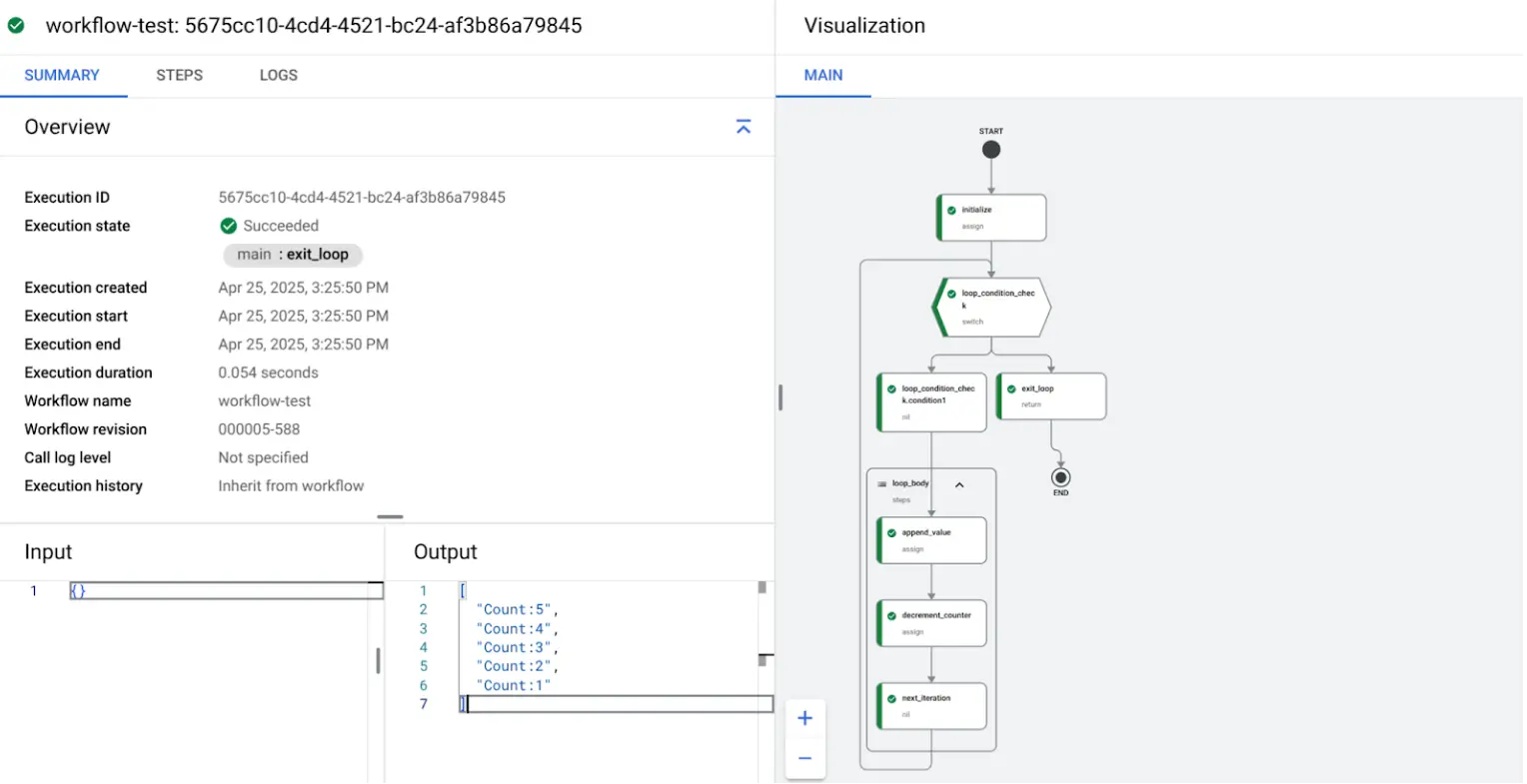
Implements a loop that starts with `counter = 5`, appends `"Count:<value>"` to a list on each iteration, and stops when the counter reaches 0.
Error Handling
main:
  steps:
    - risky_step:
        try:
          steps:
            - may_fail:
                call: http.get
                args:
                  url: "https://unstable-service.com"
        except:
          as: e
          steps:
            - handle_error:
                assign:
                  - error: ${e}
            - return_error:
                return: ${error}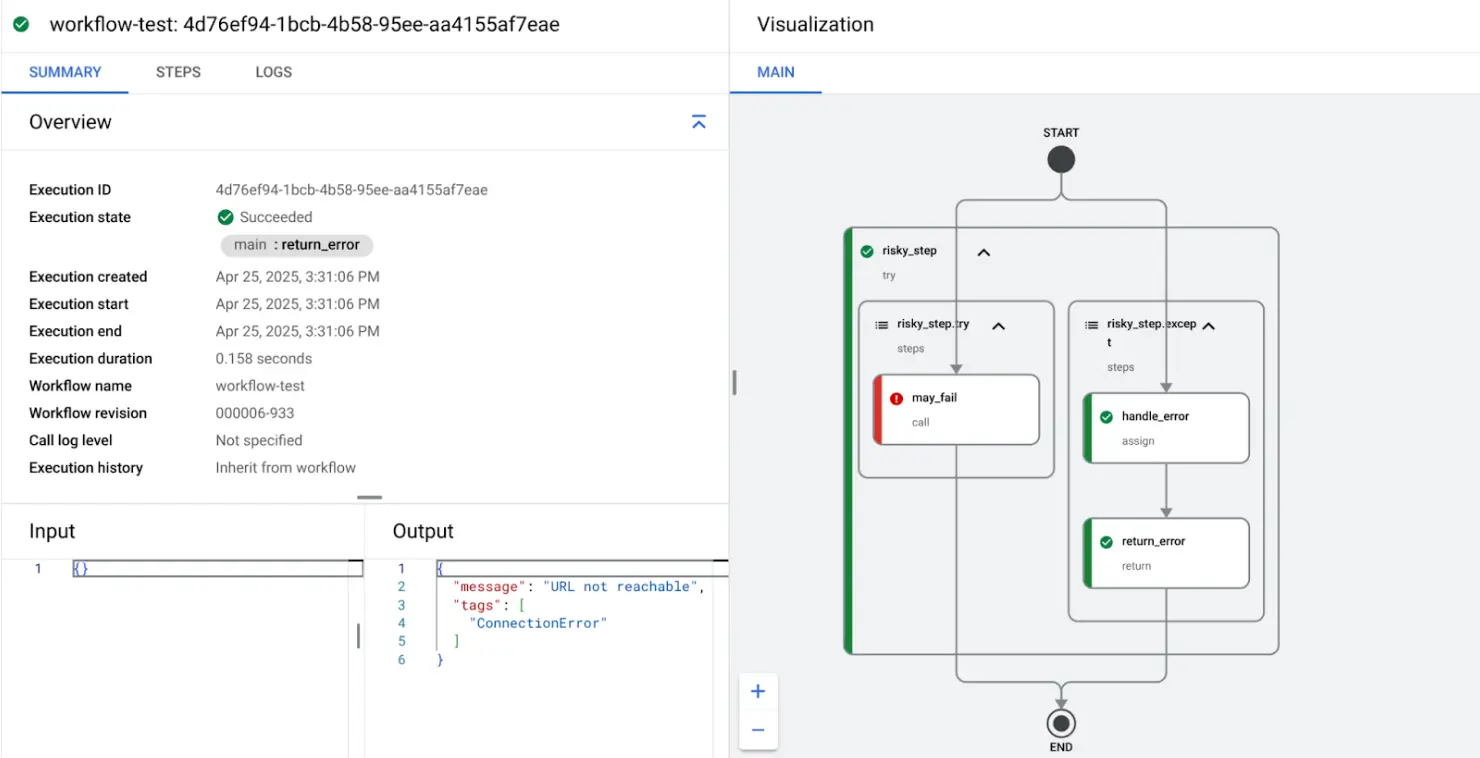
Demonstrates how to use a `try` block to handle errors gracefully. In
this example, the workflow attempts to fetch from an invalid URL (`https://unstable-service.com`), catches the resulting error, and returns it
in a structured format.
Cloud Function + BigQuery Flow
main:
  steps:
    - call_function:
        call: http.post
        args:
          url: "https://your-cloud-run-function-url"
          body:
            input: "data"
        result: function_output

    - log_step:
        call: sys.log
        args:
          text: ${function_output}
          severity: "INFO"

    - write_bq:
        call: googleapis.bigquery.v2.tabledata.insertAll
        args:
          projectId: "my-project"
          datasetId: "my_dataset"
          tableId: "my_table"
          body:
            rows:
              - json:
                result: ${function_output.body}
Sends a POST request to a Cloud Run Function endpoint, logs the output, and inserts the result into a BigQuery table using `tabledata.insertAll`.
Best Practices
- Logging & Monitoring - Use
sys.logand Cloud Monitoring dashboards. - Security - Store API keys and other sensitive data in Secret Manager, and fetch them securely at runtime using least-privileged service accounts.
- Optimization - Keep steps modular, minimize API calls, use parallelism.
Conclusion
Google Cloud Workflows is a powerful tool for orchestrating cloud-native services and APIs with minimal overhead. It’s serverless, scalable, and cost-effective, making it an excellent choice for automation pipelines, API orchestration, and lightweight workflows.